Last week, I shared a list of 16 alternatives to Microsoft Money. These applications offer a variety of solutions for managing your personal finances.
But not everyone wants to use a specialized computer program to track their spending. Many Get Rich Slowly readers (including my wife) are content to manage their money with a spreadsheet. Spreadsheets are easily customizable, and if you know what you’re doing, they can actually be a lot more powerful than standard personal-finance software.
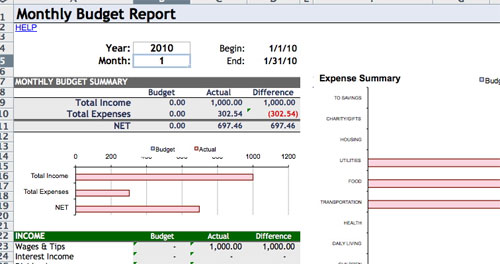
You spreadsheet wizards may want to check out personal finance templates from Google Docs. These documents are part of Google’s template gallery, and are freely available for personal use. Don’t like Google Docs? It’s easy enough to export these files in XLS format so that you can use them with a desktop spreadsheet program.
There are currently 33 personal-finance templates in Google’s library:
- Use the checkbook register or the bank account ledger to track your spending.
- Build a budget with the family budget planner or the personal monthly budget.
- Plan your future with a savings calculator.
- Track your debt with a credit card payoff calculator, mortgage payoff calculator, or a simple loan calculator.
- There are even specialized tools, such as: the wedding budget manager, the shared house expenses tracker, road trip planner, auto expense report, and more.
To view the entire list, check out the personal finance templates at Google Docs. (Some of you may also be interested in the business templates.)
GRS is committed to helping our readers save and achieve your financial goals.Savings interest rates may be low, but that’s all the more reason to shop for the best rate.Find the highest savings interest rate from Ally Bank, Capital One 360, Everbank, and more.
This article is about Money Hacks, Tools
Disclaimer: This content is not provided or commissioned by American Express. Opinions expressed here are author's alone, not those of American Express, and have not been reviewed, approved or otherwise endorsed by American Express. This site may be compensated through American Express Affiliate Program.
Discover is a paid advertiser of this site. Reasonable efforts are made to maintain accurate information. See the Discover online credit card application for full terms and conditions on offers and rewards.
SEARCH FOR RECENT ARTICLES


There are some good finance related templates available on the Microsoft Office website as well.
Check them out at http://office.microsoft.com/en-us/templates/FX102637491033.aspx
These cover not only Personal Finance, but also Small Business, Sales, and Accounting
loading....
I think it’s funny that you differentiate a spreadsheet from a “full-fledged computer program”, considering that lotus 1-2-3 was a spreadsheet, and probably the biggest driver making the PC a successful platform in the 80s.
loading....
What’s great about using a spreadsheet like this is you can transfer it to just about anywhere. I wrote a blog post about using Google Docs for your money management a couple weeks ago. If you combine it with an aggregator like Mint, there’s not much you can’t do with it – reports, manual transactions, bill reminders, etc. Love it! Here’s the link: http://www.thepracticalnerd.com/2009/05/29/7-steps-to-a-complete-money-management-system-for-free/
Thanks for keeping the world abreast of great financial advice, J.D.! You rock!
loading....
That’s very nice, thanks for the info. Many of my younger clients could use tools like those. I generally don’t recommend website tools like mint.com because of security concern. It takes only one rogue employee to steal all your passwords.
loading....
@Tyler (#2)
?????
I think you’re missing my point. A single spreadsheet is not a computer program. Excel is a program, but I don’t consider individual spreadsheets to be programs themselves. Quicken and Wesabe and Mint are also programs. Some people don’t want this. They already own Excel (or use Google Docs) and just want to create a new spreadsheet. That’s the differentiation I’m trying to make.
loading....
I used to have an Excel spreadsheet with many different tabs.
I’ve graduated to Mint.com and it’s really been alot simplier.
I actually prefer it over my old spreadsheet method.
loading....
from Wikipedia:
“A spreadsheet is a computer application that simulates a paper worksheet.”
You’re saying that (for example) an .xls file is a spreadsheet, but Excel itself is not (what is Excel, then)?
I was interpreting your post with the same definition that wikipedia gives, where Excel is a spreadsheet. Given that definition, I thought you were trivializing spreadsheet applications as less than “full-fledged”, which I found funny, considering how crucial they were to the development of the PC.
Even if you change the definition of spreadsheet to, “the file that a Spreadsheet application saves it’s data in”, you still need that “full-fledged program” (i.e. Excel) to track your spending, you just don’t need a special-purpose financial application to do it.
loading....
Tyler, you’re making my brain hurt!
Yes, it’s true you need a full-fledged application (Excel, etc.) to use a spreadsheet, but that doesn’t mean you need a full-fledged personal finance application. I’ve re-read this several times and think the meaning is perfectly clear. To make you happy, though, I’ve switched “full-fledged” to “specialized”.
Also, Wikipedia’s entry blurb is inaccurate. I remember my father working with paper spreadsheets when I was a boy: ledgers and the like. An individual spreadsheet referred to one specific task, much like a modern day spreadsheet file. A spreadsheet program like Excel produces spreadsheets, but is not itself a spreadsheet.
And that’s all the semantics I’m doing today…
loading....
Thank you for the information. I opened up the google monthly budget spreadsheet and started filling it out. I think I am going to really like it, I can clearly see where all my money is going and how much I’m saving.
loading....
It *is* very much semantics, but the way I initially interpreted the post made me think you had decided the class of applications to which Excel belongs (which may or may not be called ‘spreadsheets’) was a trivial application of a computer.
I found that humorous because of historical context — sort of how you might laugh if you heard someone say, “Your phone just calls people? That’s not really much of a phone, is it.” In this age of iPhones that are web browsers and GPSes and such.
loading....
Thanks for the tip! Didn’t realize Google Docs even had templates. Makes perfect sense, though.
loading....
It’s getting a little nit-picky in these parts lately.
loading....
Wow…lets just drop the semantics people!
Thanks for the ideas J.D., whatever they are.
I find using a spreadsheet the most customizable method of tracking expenses and budgeting. Though I use only 4 categories: Income, Needs, Wants and Savings.
loading....
That’s great. Thanks. I actually was using one of the budget templates before on Excel, but stopped when I realized there was nothing I could do stay on budget…
The credit card payoff calculator made me feel pretty good, though.
loading....
I’ve been using Google Docs for a few years now and love it. I built up a custom spreadsheet to break down all my expenses and at the end of every day entered my receipts into it so I could see where my money was going. One of the basics of personal finance (that I probably first read about here) but so powerful. Now when I’m in a store my spreadsheet pops up in my mind and there are times when I’ve realized I didn’t want to make an extraneous purchase because I didn’t want to enter it in – I keep the extras category really little!
When I got married last year my dear husband jumped right on board and he keeps a list by the laptop of his daily expenses for me to enter in. Now that there’s twice as much money to keep track of and so much to plan for I feel so much more empowered than I have ever felt in my life financially when I’m looking at all those figures neatly lined up and the bottom line growing more and more.
I also love that I can access Google Docs from work and when I’m out of town (and near a computer), and that it’s online so I don’t have to worry about backing it up on my computer.
I even set up my address book online in a spreadsheet and have shared it with family – it’s a nice little database of names, addresses, and phone numbers that’s easily update-able and accessible – and FREE.
AND NOW you have introduced me to the personal finance template!! While I love my own design I can see already I can further refine it using their template. So I can blame you for the several hours I’m going to spend inside this weekend in front of the computer having fun in Google Docs. :0)
P.S. After reading the above comments I’m just not sure if I’m using the term “spreadsheet” correctly but I’m going to guess you know what I am trying to say. LOL.
loading....
I’m curious what luck, if any, people have had with setting up categories for reporting from within Google Spreadsheets. That is, I’d love to use Mint, but they don’t have all of my banks available and I’m not going to switch banks just to use Mint’s features. I’ve set up some solid Google Spreadsheets (very similar to the ones JD linked to, actually) but I miss Mint’s ability (or the ability in most PF software) to show a breakdown of my expenses by month/category/etc.
Right now, I’m able to keep solid and extensive historical records, which is certainly important, but I can’t find a way with Google Spreadsheets to make the leap into getting all of the nice reports I could with a dedicated finance software setup or something like Mint.
Any thoughts or suggestions? I’ve looked into other Mint-like sites, including ones that more easily let you enter information for banks they can’t automatically pull info from, but they all seem either more complicated that I’d like or with poor interfaces. I’d like to be able to have simple ledgers, one for each account, and have each transaction assigned to a category so I can see how much I’m spending on X, Y, or Z for a particular timeframe.
I probably just need to bite the bullet and go back to GnuCash or use KMyMoney, they just seem like such overkill and I do like being able to check/manage my info from anywhere online…
loading....
@ Rebecca
That’s a good question. Now that I’m trained to enter in my receipts and keep track of all my expenses, and now that my spreadsheet feels as custom as it’s going to get, I’m ready for comparisons and percentages for reporting (for things like comparing categories month to month and figuring the percentages of the categories vs. net income).
I’ll probably use the formula function in Google Docs to set something up – it will take some time, but like I posted above, I like many features of Google Docs and will probably put the time in. As far as pulling information from banks – I think you’ll just have to use GnuCash or use KMyMoney like you said – use it just what you need it for.
Sorry I don’t have better answers! I suspect that everyone who uses spreadsheets/software uses only the parts they like and customizes the rest since “one size does not fit all”. Time consuming but worth it.
loading....
Love these – I just spent about an hour & a half playing around with the mortgage calculator and 5 different options for home ownership freedom!
Thanks for sharing, Jenny
loading....
I’ve been looking and testing myself different financial spreadsheets over the years (some of them free in other websites and some that are being sold) but didn’t know about those on Google.
I first started (15 years ago) to manage my personal finances in Excel and that worked very well (self-made spreadsheet). Then I moved to Quicken because of the planning and reporting features, but I lost some control. Now I am using a combination of YNAB (for budgeting and spending management purposes) and a spreadsheet to handle my investments, which works very well.
loading....
Gret templates and could be very useful to those tracking personal finance. I built a tracking sheet from Excel and it’s always amazing when you see the numbers in front of you constantly. If you never look at the numbers, you can’t be surprised when the end of the month comes. This post could help a lot of people.
loading....
Way cool! Some extremely valid points! I appreciate you penning this article and the rest of the site is really good.
loading....