Free Debt Snowball Spreadsheet Print
Tuesday, 26th August 2008 (by J.D.)This article is about Debt, Money Hacks, Planning, Tools
Vertex42, a site devoted to Microsoft Excel templates, spreadsheets, and calendars, has posted a free debt snowball calculator. From the description:
This spreadsheet allows you to choose different debt reduction strategies, including the debt snowball effect (paying the lowest balance first) and highest interest first. Just choose the strategy from a dropdown box after you enter your creditor information into the worksheet.
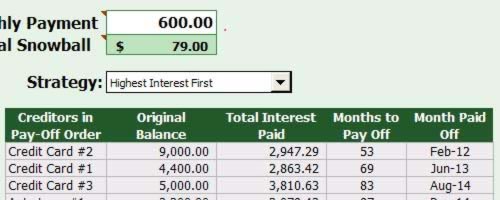
This file contains two worksheets:
- A debt reduction calculator, which allows you to list your debts, their balances, interest rates, and monthly payments.
- A payment schedule telling you which bills to pay when.
The brilliant thing about this spreadsheet — other than the fact it does all the math for you — is that it allows you to choose from a variety of snowball methods. You can use the Dave Ramsey-esque “low balance first” debt snowball, the mathematically superior “high interest first” method, opt for no snowball at all, or — and this is the best part — enter your own payoff order. Got a loan from your brother-in-law that drives you nuts? Prioritize it and this spreadsheet will make sure it’s finished first.
I wish I had access to a tool like this when I was first starting to dig out of debt…
[Vertex42: Debt reduction snowball calculator, via the redoubtable Ben Popken at The Consumerist]

RSS Feeds
Facebook
Twitter


August 26th, 2008 at 1:26 pm
Before we did not have these smart tools because Internet was not massively popular and it was not accessible to everyone. By performing a simple search, we can now discover so many smart tools like these.
A Dawn Journal
http://www.adawnjournal.com
August 26th, 2008 at 1:31 pm
I used to have a spreadsheet to track my spending, but it was just so much hassle to track everything in it.
August 26th, 2008 at 1:33 pm
There are several tools now that can help. However, you will always have that group of people that say “I don’t have time”
With all these tools, blogs, magazines about personal finance, why are so many people still not taking advantage?
August 26th, 2008 at 1:49 pm
I’ve created one similar to this but much more complicated. Took way too much time to make. But it allows me to add in extra payments on just a one month basis. So if I know I’ll get a raise next year, I can change how much I can add on a month by month basis.
The simplicity of this is probably worth it in itself though.
August 26th, 2008 at 3:56 pm
Although I have no CC debt I like the template a lot. Keep coming with tools like this.
August 26th, 2008 at 4:03 pm
The calculator is easy enough to use. However, after plugging in my numbers, the year under the “Month Paid Off” column is off. For example, my credit card that should be paid off in 13 months is shown to be paid off in Oct-08. Perhaps the formula needs to be corrected.
August 26th, 2008 at 4:04 pm
Great tool, thanks for sharing!
The biggest limitation I see is that it assumes a steady required minimum payment in each account over time. In real life, your minimum payment on a credit card is often a percentage of the balance or some other calculation. But that’s just a minor complaint.
August 26th, 2008 at 4:57 pm
Thanks for the new program tip.
Quicken.com also has a a free online debt reduction planner under the “tools” section. It helped me in the past. I also like Bankrate’s mortgage payment calculator. Printing out amortization tables as variables change has weirdly become a guilty pleasure.
August 26th, 2008 at 6:50 pm
Thanks for pointing out this simple tool! Invoicing and billing can be some of the most time-consuming tasks for all kinds of business owners and entrepreneurs. And many small business owners in particular and independent contractors, etc. have a hard time finding programs and applications that are affordable and easy to use. Invoicing and related tasks don’t have to be complicated in most cases, and this is a nice little tool for streamlining the process so it’s not so frustrating.
August 26th, 2008 at 6:58 pm
I like the ones this guy built much better:
http://www.geocities.com/schizeckinosy/Snowball.html
August 26th, 2008 at 7:07 pm
You should sticky this to the new section in the forums for ‘Tips, Tricks, Links, Pointers’ so that it doesn’t get lost in time.
August 26th, 2008 at 7:41 pm
Technology is just great when it makes your life easier and better.
August 26th, 2008 at 7:54 pm
Thanks for the tool. I really enjoy GetRichSlowly.org and thought I’d offer a budgeting spreadsheet that I’ve used for years to support the Dave Ramsey approach as outlined in Total Money Makeover. It’s worked well for me and I feel that I should extend a hand by offering the tool to others. I hope someone will find it helpful. I tried to keep it simple and intuitive. You just need Excel and a few minutes to play with it. It’s available in the top posting at my blog below.
Enjoy.
Adam @ http://www.avoidregret.com
August 26th, 2008 at 8:12 pm
I’m a big fan of spreadsheets in general because they help us to ‘live in reality’, with real-time updates as our money situation keep changing. I do think that our financial profiles improve as we consume less, and I also think our quality of life can be as high as ever (sometimes higher) as we consume less. Here is an example of that principle, centered on using less gasoline: http://www.diamondcutlife.org/how-to-save-money-on-gas/.
August 26th, 2008 at 9:00 pm
Thank you for posting this. I didn’t know there was a spreadsheet template out there to help with the debt snowball.
August 26th, 2008 at 9:15 pm
Thanks for the spreadsheet, I downloaded a copy and will be sharing this post with a few people, thanks.
-Tabs
August 26th, 2008 at 11:06 pm
Funny Timing,
I grabbed this about a week and a half ago after getting acquainted with your site and some of the books you suggest.
I googled around for awhile and found this spreadsheet to be the best as far as cleanliness and ease of use.
My wife and I were able to sit down and see where we would stand in just a matter of minutes.
Glad that you shared this with everybody.
August 27th, 2008 at 4:58 am
A great example of technology being put to a sensible and ‘useful’ use. Good stuff.
August 27th, 2008 at 8:53 am
Awesome spreadsheet. Wish I had that when I was helping a friend arrange her debt snowball. I did it mostly manually in excel, and I’m not a spreadsheet ninja.
August 27th, 2008 at 4:59 pm
This is my favorite place for a debt snowball:
http://www.whatsthecost.com
You plug in your info and decide if you want to pay the lowest balance or highest interest first. It tells you what to pay to what card and when, and updates how long it will be until you’re debt free. You update it when you make payments or when you spend - and you can personalize that information as well.
Did I mention it’s FREE?
September 27th, 2008 at 2:22 pm
Thanks or the review, J.D.
Thought I should mention that due to multiple requests, the Debt Reduction Calculator now works in OpenOffice. The download contains two .ods files (one for up to 10 creditors and the other for up to 20).
Enjoy,
Jon W.
March 23rd, 2009 at 1:35 pm
amazing! this answered the exact questions i had about paying down 3 different student loans (me, my SO, and my SO’s parent loan). woo!!