Playing with Numbers: Using Spreadsheets to Learn About Money Print
Monday, 2nd February 2009 (by J.D.)This article is about Money Hacks, Tools
One of my favorite personal finance tools is the spreadsheet. Although I’m no Excel master, I’ve found that I can create a spreadsheet to find answers for many money questions that I have. If I run into problems, I ask Google…or my wife. (Kris took an Excel training course.) Here are some recent questions GRS readers have e-mailed me that could be answered in just a few minutes playing with formulas:
- “Won’t using multiple savings accounts mean I earn less compound interest?”
- “I found a great deal on a used car. Should I buy it, or should I fund my Roth IRA?”
- “I have $5,000 in an HSBC Direct account. Does it make sense to switch to a bank with a higher rate?”
- “How much does it really cost to pay the minimum on your credit card bill?”
I know that Microsoft Excel and its ilk can be intimidating, but I’ve found that an hour playing with numbers can yield excellent results. Not only do I learn a little more about spreadsheets, but I can find answers to some of my financial questions. Let’s look at some examples.
Subaccounts and compound interest
First, let’s tackle a problem that confuses a lot of people (including my wife, who is the smartest person I know). Jules recently wrote to ask:
Regarding ING and multiple accounts: Would the overall interest earned be different if you have the total amount in one account versus having the same amount split into several subaccounts? I love the subaccounts, but am curious if I’m decreasing my monthly interest.
This is a fairly simply spreadsheet to construct. For this example, let’s compare a single $10,000 investment to the same total divided among three different accounts (labeled Split One, Split Two, and Split Three). A few minutes of formatting, and we can see the results:
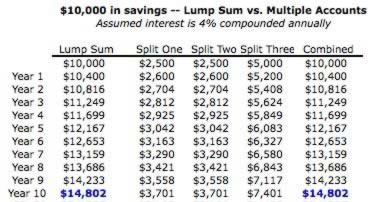
As long as all of your accounts are earning the same interest rate, you’ll earn the same compound return over 100 small accounts as you would over one large account. This fools a lot of people, but it’s true.
The cost of waiting one year
What about investing? How much harder did I make it on myself by waiting to begin my retirement savings until I was nearly 40 than starting at age 20? What happens if one year I choose to use my money to buy a car instead of invest for retirement? Again, a spreadsheet can help us find the answer.
If I were 20 years old and made $5,000 investments every year until age 65, and I earned an 8% return after taxes (just assume with me), I’d have $1,932,528.09 saved at retirement. But I’m not 20 year old. I’m 39. If I still wanted that $1.9 million at retirement, how much do I need to save?
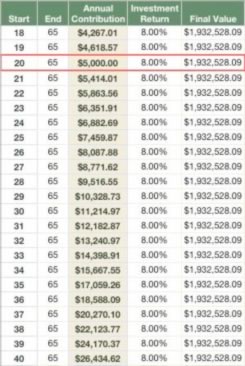
Holy cats! I’d need to contribute $24,170 a year for the next 25 years in order to catch up with my hypothetical younger self. Sure, my earning power has increased since I was 20, but it hasn’t increased that much. There’s a reason I marvel at the extraordinary power of compound interest. A spreadsheet makes it clear.
Rate chasing
Some people enjoy “rate chasing”, tracking down the best interest rates on savings accounts and certificates of deposit. Different banks adjust their interest rates at different times, so it can pay to hop from one to the other. But how much does it pay?
The following spreadsheet shows the annual interest earned on different deposit amounts from different sources. All are actual recent savings rates (CCFCU is my local credit union) except the last, which is a typical rewards checking rate at the moment. (ING Direct would like me to note that their current rate is not what is shown in the image below. That rate was current when I created the screenshot.)
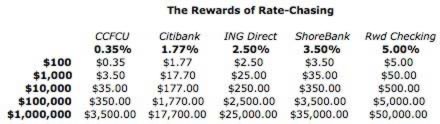
For somebody living paycheck-to-paycheck, chasing the best interest rate doesn’t make sense. If you only keep about $100 in the bank, you only save a few bucks a year by moving from the worst rate to the best. If, however, you had a million dollars (and for some reason had it in a bank instead of a higher-yielding investment), you could earn thousands of dollars a year by chasing the best rate.
Most of us fall somewhere in the middle. For myself, I’m happy to continue using ING Direct based on my current balances. But if I had substantially more in savings, I might look for a better deal elsewhere.
Playing with numbers
Some of you are probably frustrated that I’m not showing how to actually build these spreadsheets: the formulas, etc. If there’s enough interest, I may do that on a Saturday entry sometime. For today, though, I wanted to demonstrate that you don’t need fancy web calculators or personal-finance programs to answer certain questions. All you need is Google Docs.
“Excel is awesome,” Kris said when she saw me working on this post. These are just a few examples of how you can use a spreadsheet to explore your finances and answer questions about money. You can do a lot more. In fact, many GRS readers have told me they keep their entire financial lives in a spreadsheet. (And here’s a post from the early days of GRS about handy personal finance spreadsheets.)
It can be a lot of fun to play with a spreadsheet. (Well, for me, anyhow.) What about you? Do you use a spreadsheet to track your money? To explore “what if” scenarios? Do you have any tips or tricks you can share?
It’s spreadsheet day for me today! I also wrote about my love of fitness spreadsheets at Get Fit Slowly.

RSS Feeds
Facebook
Twitter

February 2nd, 2009 at 5:23 am
Its fun for me to play with them too! I love trying out the different combination to see what I can get in the end.
February 2nd, 2009 at 5:38 am
I love spreadsheets! I’m an engineer by trade, and so is my girlfriend, so we use spreadsheets for a lot of personal stuff because of our familiarity to them, and their usefulness. We have a snowball spreadsheet on which all of our student/car/personal loans and mortgage are on. This helps us remember how much we’ve decided to overpay, and on which loan. It also gives us payoff dates for each of our loans so we can feel good that we’re approaching goals.
We also use a workbook to track costs of finishing our basement and I manually enter ALL basement finishing receipts to track every expense. This will help us keep track of how much we spent on each area (electrical, lumber, insulation, etc..) and will also come in handy as a record of increased cost basis in our house.
In another spreadsheet I track my hours worked by work week, and deposit made for associated work week. I did catch one mistake last year using this (I submitted a timesheet from the previous week and shorted myself 1/2 hour).
In another sheet we track the bills for our house. I keep track of more than just the total cost. I track the qty used of (water, electric, gas) rate (summer vs. winter) and average daily temperature.
Above are the recurring spreadsheets but I also use them for a lot of one time calculations like when my girlfriend was determining whether or not she wanted to get a new car, or to see how many amps my home theater equipment would pull on one circuit in my basement.
February 2nd, 2009 at 5:46 am
I think the first community college course I take after I graduate with my bachelor’s in December is going to be along the lines of Excel 101. I’ve always been interested in learning how to use spreadsheets, but I just don’t seem to be able to get the hang of it on my own. Are there any books or websites you could recommend?
February 2nd, 2009 at 5:56 am
JD,
Not trying to plug my site and you can remove the link if you want, and just try and upload the file (I can’t do that on my end.)On this post there is a link to download some spread sheets I’ve created for budgeting, income comparisons, and other purposes. The spread sheets are all excel, so users must have the program to manipulate the data. Here’s the link.
http://www.my5k5k.com/profiles/blogs/time-to-crunch-some-numbers
February 2nd, 2009 at 5:56 am
Thanks for this post! It has some great tips
I use a spreadsheet for my monthly budget and to keep track of my spending… and to see how much my net worth actually increases each month. It’s a great motivator to save.
February 2nd, 2009 at 6:00 am
I also love playing with Excel. I’m not the best at creating eye pleasing spreadsheets, but I’m usually able to get the job done.
J.D. says that his wife is the smartest person he knows, but it sounds like he is pretty smart himself for making sure he compliments her :).
Good post!
February 2nd, 2009 at 6:01 am
Great post.
I love Excel– I use it as my scratch pad for budgets and decisions all the time.
February 2nd, 2009 at 6:04 am
I really don’t know how people make decisions without Excel. I have a sheet for just about everything. The most important is my “Snowball” sheet I’d guess you’d call it. It has all my loans (8-9) amortization schedules lined up from highest to lowest interest. It has input what I expect to pay extra each month along with all the minimum payments. It does a few main things:
1. Double checks the amount of my payment which should go to principal/interest. (The bank is NOT always right on this one)
2. Carrys over extra payments as loans are paid off. Allows me to see the compounding effect of extra payments now on the final end date. Ex ($100 now is worth $175 after loans are paid of).
Its very motivating when you can say what happens if I pay $50 extra each month. Then compound that over all your loans. See the payments drop off in the end.
February 2nd, 2009 at 6:06 am
I do all of my finance planning in Excel. It’s the only tool I use for budgeting. If you learn just a little about creating an Assumptions page, you can play around with different variables (like percentage rates of return) by changing one field on the Assumptions tab instead of changing your whole spreadsheet. Here’s a link to the Microsoft tutorial on Assumptions
http://msdn.microsoft.com/en-us/library/bb839334.aspx
February 2nd, 2009 at 6:09 am
I have no excel skills. I’ve looked at certain sites to learn excel skills but they don’t relate to what I’d want (personal finance) so I don’t stick with them.
If you could do a saturday post to help us non-users out, that would be great. Specifically, I’d love one that you could input your monthly expenses in, and similar to the retirement calendar show me how much cutting cable would mean to my retirement.
Now I’m saving $50 a month and assuming I get 8%… That would make small choices today easier to make since I would be able to see the big picture.
February 2nd, 2009 at 6:14 am
I don’t really think its a matter of learning how to use Excel. But rather understanding the fundamental principals and main equations of personal finance. Primarily the different ways of interest calculation. Along with fully understanding all the terms (rates, fees, etc.) of your accounts.
February 2nd, 2009 at 6:38 am
I’m a spreadsheet geek too, I love to play around with scenarios. Adjust the various savings amounts, expected rate of return, time period etc to see where I might be in 10 or 20 years. I don’t use budgeting software, just my trusty spreadsheet that I’ve been using for years. I prefer them because they can be as simple or complex as you need and tailored however you want.
February 2nd, 2009 at 6:40 am
I use Excel (or Acess) for almost everything! I actually prefer the Access DB because of the reports and user interfaces I can generate, but I found when sharing them with other people, they preferred Excel. So I started using that to be more compatable.
I use Excel currently to track my expenses from Month to month.
I also created a “Leave Projection Tracker” for my job. I accumulate x hours of leave per pay period. I travel to teach at a lot of conferences and workshops. I try to project my calendar a year in advance to see if I will have leave to travel and for personal time.
One of my favorites was a GPA estimator I created while in college. I would plug in my credits from any given quarter and be able to predict a best and worse case scenerio as we approached the end of the quarter.
February 2nd, 2009 at 6:49 am
Excel is amazing. I use it to keep track of my rental property accounts - no real accounting necessary. It’s also vital to budgeting/keeping track of your expenses.
February 2nd, 2009 at 6:57 am
Do I like to use excel? Hmm, I would have to say yes
February 2nd, 2009 at 7:19 am
I am an accountant by trade and spend most of my days in Excel. That being said I love playing with spreadsheets! I have one to track all of our spending, summarize it on one page, create a budget (using past summary spreadsheets to see where we spend). My hubby and I use this spreadsheet to pinpoint where we are doing well and where we need to cut back. I also have a grocery list spreadsheet that we use every week. I pull prices from our grocery stores online shopping program. We come up with a meal plan for the week and know exactly how much we are going to spend going into the store. I think spreadsheets are a great way to keep myself in check.
February 2nd, 2009 at 7:28 am
JD - Great post, and your expletive of “Holy cats!” made me choke on my morning Red Bull!
February 2nd, 2009 at 7:29 am
Great post and thanks for showing us specific examples of how you can use spreadsheets. I’m also addicted to using Excel to crunch some numbers here and there, but these were some great ways to make that happen.
Thanks!
February 2nd, 2009 at 7:37 am
Excel is awesome, but since I have no idea how to make it work I’m happy Mr. Sam can make up those charts for me/us. He also can create pie and bar charts which are helpful when I’m using an excel chart to track a specific goal.
February 2nd, 2009 at 7:44 am
Comments #2 & #8 both mention a “Snowball” spreadsheet. I would like to learn more about what this is and how you set it up. Any handy links for this concept?
February 2nd, 2009 at 8:10 am
#4 Chet, any other place with the spreadsheets? I don’t want to sign up for a site about running a 5k.
February 2nd, 2009 at 8:12 am
I love, love, LOVE Excel, and not just because it’s free. I use it for my zero-based budget, to track my monthly expenses, to chart my progress (vis a vis my spending versus my income) and to estimate the time it will take to pay off my $56K in student loans (too long, btw).
I publish my zero-based budget on my blog, if anyone is interested in seeing what this is. I also have a ‘vanilla’ version (i.e. none of my personal information) that I’ll email to folks who want to try it out. This type of budget (and the ease of using Excel) has been one of the keys to my paying off almost $5,000 in credit card debt last year.
February 2nd, 2009 at 8:17 am
I was all into spreadsheets when we were ramping up our snowball strategy, then when we knocked out three or four accounts, I let it slide. Result: that auto loan is still hanging out there. This morning, though, I built a new spreadsheet to track how we’re going to pay it off in nine months.
There are templates out there, but I find it easier to make my own. All I used was a statement showing my last three payments, balance, and the daily periodic rate, to double-check my calculations before projecting it out.
February 2nd, 2009 at 8:27 am
Question #1 is a case of “all things being equal…” except that in the real world all things are not equal. Every institution I’ve ever dealt with has a variable interest rate dependent upon the total funds on deposit. In such a case, it is best to have as few accounts as possible.
February 2nd, 2009 at 8:29 am
I wrote about a debt snowball spreadsheet in August, for those of you who are looking. I haven’t used this spreadsheet myself. Have any of you?
February 2nd, 2009 at 8:39 am
LOVE spreadsheets - I use them all the time at work and home! They make tracking things so much easier.
February 2nd, 2009 at 8:40 am
@bakednudel
Sorry, I forgot I had privacy settings on my site. I have opened the site up to the public for today, so you may want to try it again.
February 2nd, 2009 at 8:47 am
I use Quicken to keep me on track for actual movement of money here and there, but I use spreadsheets to play with different scenarios. I too adore spreadsheets. My formulas are crude, but they’ve sure helped me keep track of certain investments.
February 2nd, 2009 at 9:01 am
I use Excel all the time. It’s #1 on my windows XP “most opened programs” list. Often I use it instead of a calculator (any time I have more than 3 numbers to combine) because it lets me go back and adjust some of the numbers.
I read somewhere that the most popular use of Excel is to simply make lists.
February 2nd, 2009 at 9:10 am
For those of you looking for an excellent free alternative, the OpenOffice.org suite is quite nice:
http://www.openoffice.org/
I didn’t have a copy of Excel, so I’ve been using the OOo Calc program. It can open and edit Excel spreadsheets (and other formats, I think).
No affiliation; I just like what they do.
February 2nd, 2009 at 9:15 am
I have an Excel spreadsheet that I use to keep track of my short-term financial life (not investments/401k etc):
Sheet 1: An overall balance sheet. I can look here for the snapshot
Sheet 2: My checking account
Sheet 3: My budget: Here I have my income broken down into budgeting categories (Housing, transport, Debt, food, household etc). I can adjust the percentage for each category and can figure how much each account gets.
Sheet 4: A paycheck split calculator: Since I have two jobs, and earning from the second job fluctuates some, this sheet lets me figure how much money goes to each account based on the percentage of the budget.
Sheet 5-11: Major Group accounts: sheet 5 is housing and has sub accounts for rent and insurance etc…
Sheet 12 is my “buffer” account. Money not immediately assigned goes here (when I make more than my budget). Money in this account is used to shore up low accounts (like gas for the car) and for paying for things not in budget.
It looks complicated, but after hours of work, everything updates to the front sheet so I can go there if I need to know how much money is in my food budget.
Oh, and the tabs are colored by group for easy visual ID
February 2nd, 2009 at 9:31 am
I, too, use Excel a lot and recommend that everyone get acquainted with it. However, if you don’t have a copy of Excel try Google Documents. Open a new spreadsheet there and get familiar with the basics. I have learned more about Excel (and MS-Word) from fooling around with the menus and the help function than any classes I’ve taken.
February 2nd, 2009 at 9:38 am
You can count me in as one of those people who put a good portion of their lives on a spreadsheet.
Financial stuff, blog stuff, ‘to do’ list for things around the house…it’s all there!
February 2nd, 2009 at 9:42 am
My husband and I keep track of our finances using Google-document spreadsheets. That way, we can access the information from anywhere, on any computer, and even at the same time from different locations. It works almost the same as Excel, and you can transfer the documents to Excel easily. I love it!
February 2nd, 2009 at 9:43 am
I use spreadsheets for just about everything. For example, right now my boyfriend is evaluating job offers from different firms. So I whipped up a spreadsheet, where he can just plug in the salary each firm is offering, how much they take out for health insurance, how much they match for retirement, and the amount he would have to spend on an apartment in that area and VOILA! It breaks everything down for him: taxes, disposable income, everything he wants to know. We keep adding things to it and adjusting it, so it’s really helpful for him.
February 2nd, 2009 at 9:55 am
I use a basic spreadsheet to track my budget and spending. I have found that the spreadsheet has been a huge contributing factor in helping me to become a more effective money manager. Being able to see at a glance how much I’ve spent over the month is a big motivator.
February 2nd, 2009 at 9:57 am
Wonderful Post, JD. This is why I keep coming back to your site.
February 2nd, 2009 at 10:10 am
I remember having to do a retirement calculator in my accounting grad school class. I still cringe at the amount of money that needs to be saved and at the impact inflation has. I noticed that inflation isn’t included in this example.
February 2nd, 2009 at 10:24 am
Speadsheets can be great. But they can also be dangerous. I work with some folks who get so into the details that they forget about the big picture. Also, they try to project out 10 or more years. Often, you can’t do that. I sometimes fear that people get addicted to the small details and it costs them an accurate view of reality.
February 2nd, 2009 at 10:37 am
I have used spreadsheets to compare things like job offers or health insurance plans. The click-and-drag feature to pull an assumption out to a future date is fabulous!
Currently I have our household budget in a spreadsheet and a debt payment/savings spreadsheet going as well. That one was especially effective when I saw how a drop in income that involved reprioritizing our payments affected how quickly we paid a mortgage vs. what we had hoped to pay. Very motivating for this year’s budget.
February 2nd, 2009 at 10:46 am
Won’t using multiple savings accounts mean I earn less compound interest?
As they say, there are no stupid questions…
February 2nd, 2009 at 10:48 am
I use Excel spreadsheets for all of my finances, as well as decision making, like deciding which flight to purchase. I have spreadsheets for my budget, my loans, and just started one for my ‘price book.’
I think this is what keeps me from trying software like Quicken, Mint, or YNAB. I’m already doing it myself and like my system, and can add or delete categories the way I like.
February 2nd, 2009 at 10:53 am
I use Excel spreadsheets all the time, and am almost obsessed with them.
I suppose my favourite one is my one of Bills. Each sheet is a running ledger of Bills-Payments-Debts-Balances of each utility Gas, Power, Water, etc.
My favourite sheet in that workbook would have to be my mortgage. I track my payments, balance, total interest paid (Since owning my house, in almost 7 years we’ve paid $22,000 in interest on a $65,000. FYI, In your first few years make more than the minimum payments,ouch) and love watching the balance owing to the bank fall.
@JD, I love your page about “Owning your home in half the time” (http://www.getrichslowly.org/blog/2008/02/12/mortgage-prepayment-made-easy-own-your-home-in-half-the-time/), once I own my house with my fiancee I want to agressively pay down mortgage, and so I’m wondering how your progress is? How has the extra money thrown at it knocked down the balance?
February 2nd, 2009 at 11:01 am
I use Excel for basic budgeting/tracking where my money is (I use Excel to track “subaccounts”) instead of creating actual separate ones.
The one thing I’ve been struggling to figure out is how to set up a spreadsheet that shows actual return on investments over time. (So say if I input numbers every six months, I’d get a snapshot of how I’m doing overall.) I’d like to see if I’m getting the return on my retirement accounts that I’m aiming for or not. [Also... I'd like to someday understand how my own contributions factor into my ROI.]
I think Mint does it automatically (?) but I’m hesitant to use the service, so I’m trying to figure out how to replicate it using Excel…
February 2nd, 2009 at 11:21 am
The Small Business Administration says that less than 7% of business owners have or understand financial statements. Financial literacy is key to running a business, but it barely taught in school outside of a specific major. Hmmmmm……..
February 2nd, 2009 at 11:26 am
I wrote an article about how compound interest works for weight loss and muscle gain.
http://www.digitaltrainer.ca/blog/2009/01/pumping-iron-is-money-in-the-bank/
Cool to see you are applying the same spreadsheet principles to fitness.
@Joel: I agree with openoffice. What a great program, I recommend it to my students all the time.
February 2nd, 2009 at 11:32 am
Hello All -
I went to the Microsoft site, and downloaded a free budget spreadsheet. I use the “Monthly Family Planning Budget”, but there are other very good ones.
http://office.microsoft.com/en-us/templates/results.aspx?qu=budget&av=TPL000
Also, there is a site named vertex42 that has a great budget spreadsheet as well.
I hope this helps!
February 2nd, 2009 at 11:47 am
Check out openoffice.org spreadsheet if you want a non microsoft alternative. Has many of the same features. Completely free and open source.
February 2nd, 2009 at 12:08 pm
Excel is wonderful. I’ve had hours of informal and formal training with it. One of the latest spreadsheets I made was for my recent hunt to purchase a new/used car so I could tell the true cost of the car.
It can be found at the bottom of the post here: http://www.dmurry.com/2008/08/top-10-new-car-buying-tips
The document can be opened with Excel, Open Office or Google Docs. It’s not formatted the best, but works well to get the job done. I prefer it over using online calculators because I can easily compare multiple cars, interest rates, and terms side by side.
February 2nd, 2009 at 12:09 pm
I have been using spreadsheets to manage basic tracking of expenses. I use it to track income, gas, receipts and tuition. I have also been working to develop my own programs to do it for me, storing the data in a secure database. However, i love the idea of being able to use google docs to access my data from anywhere. Your post has got me thinking a lot about how I want to use spreadsheets more.
February 2nd, 2009 at 12:13 pm
I do this too when trying to decide where to put my money. It shows potential earnings that may not be obvious at first.
Oh, and not to mention that I keep weekly tabs on my Net Worth with Excel. It’s a great motivator!
February 2nd, 2009 at 12:32 pm
Definitely my favorite software program. Ever.
February 2nd, 2009 at 12:36 pm
I’ve been using spreadsheets to manage my budget for over 10 years. I developed it the hard way, figuring out the formulas needed to plan out my budget for as far into the future as I need it to go. At any point in time I can check my spreadsheets to see how I can manage an emergency, if I can afford a particular luxury, or how I can most quickly pay off a debt. I set savings goals and watch the numbers build.
Right now I am unemployed and my spreadsheets are more important than ever. To avoid being sent to collections for paying a bill late I have to be strategic about what I do with each weekly unemployment check. Thank goodness for the spreadsheet! It is perfect for a visual person like me who is bad at math.
February 2nd, 2009 at 1:03 pm
There is a free bi-weekly mortgage calculator in Excel for download at http://www.mrexcel.com/coolspreadsheets.html. Also on that page: a free monthly expense tracker in Excel.
February 2nd, 2009 at 1:20 pm
I also love spreadsheets. I have a budget spreadsheet all pimped out with equations so I can see how much I can save/spend and vary the income or percentage allocation super easily without recalculating everything.
Oh Excel… I love you.
February 2nd, 2009 at 1:22 pm
I use Google spreadsheets to help me figure out a realistic budget.
J.D., I’m curious about how you create your spreadsheets. Can you please share? I may get some pointers.
February 2nd, 2009 at 1:39 pm
Great job on educating people in easy to understand terms, J.D. I’m often amazed when people ask whether splitting balances will reduce interest. Most people aren’t taught practical applications of math in school where they can see interest as a proportion applied to something that has meaning to them.
One of my favorite teachers in 8th grade taught us how to write checks, build a fictitious household budget, and read a stock chart. I didn’t realize how lucky I was that my teacher taught us that until I started reading how many other people never were taught even by their parents.
This post reminds me of the saying “Give a man a fish; you have fed him for a day. Teach a man to fish; you have fed him for a lifetime.” Learning excel is an excellent “fishing pole” for personal finance!
February 2nd, 2009 at 1:44 pm
When I first began tracking my spending I used the most basic form of an excel sheet. I just wanted to track my CC purchases and wrote a list of each month’s expenses down and date so I can total them for the month and compare from month to month. Simple but a good way to start.
February 2nd, 2009 at 2:02 pm
My Snowball sheet is a bit crude and complicated. Took awhile for the extra payments to carryover. I would send it to you but would probably get scared by how large it is! I’m not very good at doing Excel sheets efficiently and neatly. Which is why my snowball sheet has nearly 100 columns and 100 rows… But its great since I know what I’m doing. Was even able to add variable interest rates and mid-month (or any day rather) extra payments.
February 2nd, 2009 at 2:08 pm
I adore spreadsheets! I use them for everything. Coding macros with Visual Basic is not all that difficult either. Last year, my day-to-day budget spreadsheet had 12 different worksheets. This year I’m trying to simplify a bit, but I still have many tracking sheets.
I use it for budgeting, mortgage amortization scenarios, personal balance sheet, piano lesson invoicing, account balancing, personal motivation point tracking, gas mileage, educational ‘games’ for kids, making chart printouts, tracking store savings…
February 2nd, 2009 at 2:42 pm
As a software engineer, I wish the programmability of spreadsheets was better. Certainly Excel for Windows will let you do almost anything, but the set of functionality in other spreadsheets (including the latest excel for Mac) is more limited.
I’ve been able to get Google spreadsheets to do what I want for the most part, but it’s required me making some really ugly formulas.
This is an example:
=IF(TODAY() > DATEVALUE(B$1 & ” 1, ” &util!$D$6), IFERROR(-SUM(FILTER(B$2:B$19, $A$2:$A$19 = LEFT($A24, SEARCH(” Budget Use”, $A24) - 1)))/FILTER(util!$B$6:$B$12, util!$A$6:$A$12 = LEFT($A24, SEARCH(” Budget Use”, $A24) - 1))), “”)
It’s really not very readable, is it? I’d like to have an SQL dialect and a major scripting language available. Maybe there’s a Python spreadsheet or something that uses SQlite.
I must be one of the few people who think that current spreadsheets just aren’t quite technical enough to work the way I want.
February 2nd, 2009 at 2:52 pm
Wow. I am really happy I read this post today. Just last night I had made a few financial (budgeting, mostly) excel spreadsheets and although I knew they were really going to come in handy, I finished feeling like a bit of a nerd because I’d had such a good time making them. I am so glad I read this and the comments, because now I know I am not the only one!
February 2nd, 2009 at 3:08 pm
#47 Natasha - Thank you for sharing that “Family Monthly Budget planner” template, I’m putting it to great use!
February 2nd, 2009 at 3:23 pm
I use spreadsheets for financial decisions all the time. Last weekend I created one to see if refinancing my house made sense, since I can save a little over 1% with the current rates. The spreadsheet told me I could reduce my monthly payment, or reduce the monthly interest I was paying, but the total interest/fees I would pay would be more with the refinance since it would extend the term of the loan by three years. This weekend I used a spreadsheet to do the math on my 1040. Thanks for all your great info, J.D.
February 2nd, 2009 at 4:12 pm
Thank you for spreading the belief of 8% average annual return for retirement investment.
February 2nd, 2009 at 4:30 pm
If you’d like to learn Excel, I suggest using the ‘Video Professor’ CD training series. This is the guy on the TV commercial. Get Excel one and Two… You can be up and running in an afternoon. If you don;t have Excel, you can download ‘Open Office’ for free from the web, which is compatible, or use ‘Google Spreadsheets’ directly on the web..
February 2nd, 2009 at 4:30 pm
The frustrations of a personal-finance blogger: no matter which numbers you choose for your examples, somebody’s going to complain!
February 2nd, 2009 at 5:03 pm
Spreadsheets are fantastic and I don’t know how I would make any financial decisions without them! I’m getting ready to use a simple spreadsheet to analyze by 2008 spending as we approach tax time…
February 2nd, 2009 at 5:07 pm
I’m 25 and last year I became interested in finances. Now I love to get geeky with spreadsheets.
I have created an income and balance sheet spreadsheet out of “Rich Dad’s Cashflow Game”.
I created another that’s I called “Credit Surfing” that show’s you how much can you profit when you pay everything with credit but put in savings all that you make, only paying the minimum on the cards until the 0% offer expires…you can actually profit about $100 in six months. jaja (not worth the effort, I think, but it was fun figuring it out).
I made a personal budget but arranged in a calendar format which tells you which days of the month you will be low in cash a helps you prepare for those days in advanced. (All my friends ask me for this one).
I did a couple more for business concepts and sales forecasts which is weird because I went to Art School and hated numbers for the longest time.
But I’m personally proud of a Real Estate Investment spreadsheet that helps shows you if a deal is good or not and tells you the maximum you should offer on a property.
Here’s the link: http://spreadsheets.google.com/pub?key=p_zZiQS9SFNdc27Tg9wzkTg
Phewww I’m glad I got my fetish out of my chest once and for all.
Jorge, pretarch@hotmail.com
February 2nd, 2009 at 5:29 pm
ok so i need help. i’ve been reading for a few months (love the blog btw!) and maybe i haven’t caught on where to put my dollars.
we’re currently using the snowball method to pay off our debt. we’ll be debt free in june 2010, more than likely beforehand. i feel an alarming need to put some money somewhere now. i’ve sold off clothing and i’m making a bit of money on the side with ebay. $200. yep. where should i open two $100 accounts?
ps - we’re 25 and 29.
February 2nd, 2009 at 5:46 pm
“Won’t using multiple savings accounts mean I earn less compound interest?”
Did someone really ask this question? Good grief. Lucky for them they asked you instead of me.
February 2nd, 2009 at 5:50 pm
@J.D. (#67):
Could make a spreadsheet that calculated returns every percent from 0 through 15.
February 2nd, 2009 at 5:51 pm
Since this is a frugality site I would like to put in a pitch for Open Office(http://www.openoffice.org/). It has most of the functionality of Micro$oft and anyone but the most hardcore of power-users would know the difference.
It is a nice alternative if you would rather save your money than buy $oftware and prefer not to steal it.
I have been using Open Office for several years now and am very pleased with its functionality AND the hundreds of dollars I have saved by not buying software.
February 2nd, 2009 at 6:12 pm
I don’t know where I would be without spreadsheets. I am an engineer by trade and I blog about maximizing one’s productivity with different types of engineering tools. Of course, one such tool is the ubiquitous spreadsheet.
Here are some examples of using the spreadsheet I have done in the past
1. Budgets
2. Payment plans - compare interest rates, payment amounts, or down payments. Especially useful for large purchases like cars
3. Years, months, or weeks left on a loan
4. Mortgage payments - compare bi-weekly or monthly payments
February 2nd, 2009 at 6:15 pm
Excel is awesome! I have a spreadsheet for everything. I prefer Excel to budget programs because I can customize it to do exactly what I want. I think Excel is one of those things you have to learn by doing; I have learned how to use it mainly by saying, “There has to be a way to XYZ,” and then figuring it out. I still learn new things all the time.
February 2nd, 2009 at 7:19 pm
Does anyone know where I can find an amortization spread sheet that allows to enter independently the start date of the loan and the day of the first payment ? I’ve been trying to use some spreadsheets available online track a loan that I have where the first payment was due more that 30 after the start date and the monthly payment always comes off a few cents off.
February 2nd, 2009 at 7:50 pm
Excel is the bomb! I’m an engineer too, so I use it all the time. At home, I find it to be especially useful for calculating annualized returns when you make multiple withdrawals more than once over a period of time. Normally, this would be a bit tricky, but the XIRR function makes this very easy.
If you are like me, you’ll eventually start using it for more than financial applications.
Good post, JD!
Len
February 2nd, 2009 at 8:33 pm
Call me a jaded math teacher, but your first question was better answered with arithmetic or algebra than a spreadsheet like Excel (or better the free program Gnumeric).
Arithmetic — distributive property:
(10000)*1.04^n
= (2500+2500+5000)*1.04^n
= 2500*1.04^n + 2500*1.04^n + 5000*1.04^n
Or in algebra — same property:
(x+y+z)*1.04^n = x*1.04^n + y*1.04^n + z*1.04^n
February 2nd, 2009 at 9:32 pm
I have to confess - I love spreadsheets so much, I used it for my résumé. No kidding…
Found 3 jobs with it in the last 3 years.
…and yes I use it for snowball, 0 budget, cashflow, financial statements etc.
I also like calculating mortgage payments and investment returns using the Function command.
-Charlotte
http://www.javafoto.com/
February 2nd, 2009 at 9:59 pm
Speaking for us English majors, some of us would love it if you could explain in words of one syllable how to figure compound interest in Excel. I like to play with the program, too, but being math-challenged in the extreme mostly have learned by serendipity — watching someone over their shoulder and picking up a trick here and a trick there. The Help file is so arcane, I can’t even begin to figure out what it’s saying.
Yup, I’ve sat through an Excel course, but…well…zzzzzz….
February 2nd, 2009 at 11:55 pm
I was also surprised what Excel can in order to easier your work. The charts and the functions are just two of the most important features and i use them pretty often.
February 3rd, 2009 at 2:02 am
For compound interest:
Put $1000 in cell A1.
Put 2% in cell A2.
Put 30 (for 30 years) in cell A3
For the value after five years, enter this formula in cell A4:
=A1*(1+A2)^A3
Here is why this works. You have an annual interest rate in cell A2. The part in parentheses is converting the 2% to 102%. Then, the carat is telling Excel to raise the 102% to the 30th power (multiplying 2% x 2% x 2% 30 times). When you multiply that by the original deposit, you will get the value after 30 years.
Of course, you can then plug in different interest rates in cell A2.
Gotcha: Be careful to enter the percentage sign when you type in cell A2.
Previously, someone recommended Video Professor. If you want to save money, go to YouTube and search for EXCELISFUN. Mike has 100’s of free videos there that will get you up to speed.
February 3rd, 2009 at 3:13 am
Excel is a fantastic tool if you can properly create formulas. I play with it often as well as the online calculators from bankrate.com to see how long it will take to pay off my mortgage, car loan, and credit cards. Just need to increase my income to really burn down that debt and reduce the interest I will pay.
Thanks for the post.
February 3rd, 2009 at 5:06 am
I know only the most basic of skills on excel but i still LOVE it! Along with my first cup of coffee in the a.m., it is the first thing I fire up, after I’ve logged into my bank account.
I don’t think I could have ever gotten our finances “under control” without it. Seriously.
February 3rd, 2009 at 6:31 am
I recently was shopping for a new car, and made a spreadsheet to see how long it would take to recoup the additional cost of buying a hybrid vehicle. My inputs were the two costs for a hybrid and non-hybrid car, the number of miles driven per year, and the two MPGs. Then, I had a table where each column was the price of gas (in ten-cent increments) and each row was the number of months, and in the middle was the total net loss/gain from buying a hybrid. In the end we decided it would take 6-8 years at the minimum to get our money back.
February 3rd, 2009 at 8:04 am
Dear Excel Team,
Charlotte and Bill Made comments about “calculating mortgage payments and investment returns” in Excel. As Bill (this is THE Mr Excel of http://www.mrexcel.com fame) presented, it is easy to set up in Excel. Not only that, but the reason that Excel beats all other programs on the planet is that you can change the input variables and all subsequent calculations update. And this was as Dan Bricklin and Bob Frankston (the inventors of spreadsheets) envisioned it! Not only that but you can create simple to extremely complex systems of calculations or data analysis.
Don mentioned algebra in Excel, and if you can tweak your perspective just a bit, then you will be able to do most algebra things in Excel. One key to doing algebra in Excel is to understand that the graphing calculators used in most math classes allow to you put an equation in and then see the graph. In Excel the perspective tweak that you must do is to create the data points before you graph it with a chart.
To see how to do this sort of Math thing in Excel, you can go to my “excelisfun” YouTube site and look for the video Playlist named “Various Excel Math Tricks” (about 20 videos)
To see how to do Finance things in Excel, you can go to my “excelisfun” YouTube site and look for the video Playlist named “08 Excel Series: Finance Tricks 1-17” (about 28 videos).
Not only that, but Mr Excel has an amazing YouTube site also named “bjele123” at YouTube.
All videos at YouTube are free to the world!
Excel Is Fun! (And efficient).
Sincerely, Mike Gel Girvin
February 3rd, 2009 at 8:23 am
Dear Excel Team,
The web addresses for the free Excel How To Videos are:
Excelisfun (over 500 Excel videos):
http://www.youtube.com/user/ExcelIsFun
bjele123 (about 200 Excel videos)
http://www.youtube.com/user/bjele123
Mr Excel Daily PodCast (over 800 Excel videos):
http://www.mrexcel.com/
Sincerely, Mike Gel Girvin
February 3rd, 2009 at 10:02 am
I would most definitely love an Excel post one of these days.
February 3rd, 2009 at 1:55 pm
Many have mentioned different spreadsheet applications (Excel, OpenOffice, Google). I have been using Google Spreadsheets for a little over a year now and will stick with it simply because I can edit/view it with ease at work or at home.
Here is a spreadsheet I made today after reading this post (great post by the way!). I made it to help show my wife the importance of compound interest (Einstein called it the 8th wonder of the world).
Anyway, let me know what you think!
http://spreadsheets.google.com/ccc?key=pZbff8EQVVZ7EADGT6y9bag
Go to File > Create a Copy to save it to your Google Docs and play with it.
February 3rd, 2009 at 2:14 pm
Thanks JD for the push to put some numbers in the spreadsheet, I had been working towards being CC debt free this year, and had done some simple math on how to do it, but after this post I decided to take an hour and actually put it all in the spreadsheet, its so rewarding to see it can be done this year, and the spreadsheet will be an excellent motivator for those months I don’t want to make my entire planned payment, because if I don’t stay right on track I will miss my goal.
February 3rd, 2009 at 4:20 pm
This is a FANTASTIC post. I had often wondered about splitting up my savings into different accounts and whether I was losing compound interest by not combining it into one account. I actually consolidated my savings into a one account, thinking that it would make a difference. With the current economic climate (and my personal tendency to spend it if I got it), spreading my savings around is a better option. Although I won’t be splitting it up just yet - the account I moved it to actually has the highest rate I could find.
GREAT POST!
February 3rd, 2009 at 5:17 pm
I love to run amortization schedules using a spreadsheet to see how extra principal payments can reduce interest over time. It’s a great way to reduce your balance without feeling the pinch.
February 4th, 2009 at 6:00 am
I judge that part of our love of excel (and its counterparts) is that we get to craft a tool that does what we want, whether it is just as simple checking account, a full-blown budget, or a financial test lab for the next 40 years of our life. And the measure of the love we have for our tools can be gauged by how easy and natural it is for us to use the tool and the pleasure we get from using the tool.
As I write this, I am waiting for my paycheck notification to arrive (that has extra overtime on it) so I can add those extra funds to my incoming FSA reimbursements. February won’t be as lean as I thought!
So there my Excel spreadsheet sits….waiting with me…ready to crunch the numbers.
February 5th, 2009 at 12:42 am
Another great post, JD, and an excellent reminder that playing is one of the best tools we have for learning.
February 5th, 2009 at 1:17 pm
I’m starting to wonder if the lag time offsets the extra interest from online banks. In order to buy a mutual fund last week I waited 4 days for the money to move from the online bank to my regular bank, than another 3 days to go from the regular bank to the mutual fund company. Online business is supposed to cut the fat, so why is it taking me a week to accomplish a single transaction?
I’d also love some direction on Excel formulas for financial stuff. I’ve had classwork on Excel, but it was for business usage.
March 1st, 2009 at 6:50 am
How to give your kids a pension by 18 + why don’t we get a financial education?
@Thomas above talks about pension planning above, and I took a stray comment from a friend who said that you can provide your kids pension by the time they’re 18 and it’ll make as much as paying 10% of your salary throughout your working life.
Using your idea of putting it on Google Docs, you can see it at:
http://spreadsheets.google.com/pub?key=pNrivCtAuJavqebthhcNgNg
The lovely thing about this approach is you need so much less money AND your kid’s get 10% more income throughout their lives as they’re not funding their pension.
I recognise that finding £80 per week (to create £4000 a year) is a lot to find, but as an exercise in Excel it’s still quite interesting.
Indeed, just showing your kids that their futures can be shown by the numbers 12 to 65 down the side of a spreadsheet can be a useful way in to talking about financial planning, and how actions taken now can have a marvellous effect in the future.
But as @Thomas says above, this takes no account of inflation, and assumes that 10% of salary makes a constant £2000 per year contribution throughout the working life, for the model using conventional pension funding.
Indeed the author of a brilliant set of financial lifestyle books called “Rich Dad, Poor Dad” even hints at the conspiracy theories of why it is that we, and our kids, receive such lousy or non-existent training in personal financial management.
He’s writing his next book in a collaborative way, seeking input from early readers, but to see the conspiracy theory, have a look at:
http://conspiracyoftherich.com/chapter-2
Incidentally, give we’re all frugals, you might be interested to know that there’s a free Excel equivalent in the free Open Office suite of programs, including word processor, database, and a Powerpoint-like presentation tool.
If you’re looking for both free and online, EditGrid seems to offer some exciting features including grabbing online data from other webpages (http://www.editgrid.com/) and there’s also one in the thinkfree suite, if you need to share your calculations (and documents) with other people, without having to send the spreadsheet that’s on your machine to others as an e-mail attachment.
March 11th, 2009 at 5:52 am
There are some great downloadable spreadsheets (free for personal use)at
http://www.vertex42.com/ExcelTemplates/
March 16th, 2009 at 7:57 am
For those out there who are as geeky as myself, you might want to check out extending the capabilities of Excel by using the Visual Basic editor feature which allows you to write your own Excel functions using VBA code (some programming background is very helpful).
This allowed me to create a series of spreadsheets to track every financial aspect (bank accounts, 401k accounts, credit cards, mortgage, etc) in my life and to be able to summarize all of this data into a daily snapshot with a press of a button.
March 24th, 2009 at 7:30 am
I’m just getting in to play around with spreadsheets and already I love what I can do with them to look at my savings goals. I’ve been able to look at different savings strategies and link the numbers to charts that let me visually track my goals. I’m looking forward to getting more experience with these incredible tools!
March 26th, 2009 at 8:05 am
I LOVE spreadsheets. I run simulations all the time. I currently have a budget spreadsheet that has 6 pages, for each different piece of my financial puzzle. I could tell you where I went for lunch all the way back to 2007.
I also have spreadsheets for movies I watched, gas price projections, gas mileage, and my retirement accounts.