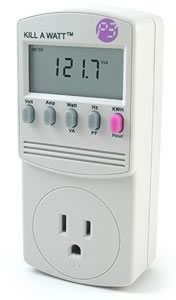
Review: Kill-a-Watt Electricity Usage Monitor
Published on - December 4th, 2006 (Modified on - November 25th, 2007) (by J.D. Roth)
In June I shared some tips for reducing home energy costs. Most of the information came from Michael Bluejay’s excellent guide to saving electricity. I was curious how much electricity invidual appliances use, so I ordered a gadget that Bluejay recommends: the Kill-a-Watt electricity meter. The official web site declares:
Connect your appliances into the Kill A Watt™, and assess how efficient they are. A large LCD display counts consumption by the Kilowatt-hour just like utility companies. You can figure out your electrical expenses by the hour, day, week, month, even an entire year. Monitor the quality of your power by displaying Voltage, Line Frequency, and Power Factor.
I’ve gone through our house and measured the power consumption of random devices:
- Microwave (while dormant, simply displaying time): 2 watts — It costs us roughly $2/year to leave the microwave plugged in all the time.
- Microwave (while heating a bowl of homemade bean soup for dinner): 2020 watts
- Nintendo Wii (while playing Trauma Center: Second Opinion): 16 watts — Far less power than I would have guessed.
- Strand of Christmas lights: 39 watts — More than I would have guessed. It will cost us roughly $3 to have this strand of lights plugged in during the Christmas season.
- MacBook Pro (recharging with battery at 66%): 58 watts
- Oil-filled radiator-style space heater: 520 watts on low, 820 watts on medium, and an unknown amount on high. I tripped the circuit breaker when I tried.
- Dual-control electric blanket (one side set to three, the other turned off): 80 watts, declining by a watt every few seconds (presumably because it requires less power as it gets warmer — I don’t know). I stopped watching after it had dropped to 58 watts.
- Desk Lamp: 5 watts
- Nighlight: 1 watt — Assuming the nightlight is on 12 hours/day, it costs about 50 cents to run for an entire year.
While researching this post, I learned that cable boxes are hidden power hogs. It hadn’t occurred to me to test ours, but I’ll do so tonight. (I read one report of a cable box drawing 100 watts. If you leave yours on 24/7 as we do, that’s about $100 a year!)
The Kill-a-Watt’s best feature is the ability to measure power consumption over time. If I want to see how much power the cable box really draws, for example, I can leave it plugged into the Kill-a-Watt. After a few days, I can check the cumulative power consumption in kilowatt hours and compare it to the amount of time that has elapsed. (Both of these are measured by the device.) Simple arithmetic will show me how much I’m spending to power the cable box!
The Kill-a-Watt does have some minor drawbacks:
- The unit doesn’t measure power consumption for large appliances like a range, or a washer or dryer.
- The unit itself is rather bulky. When you plug it in, it’s tall enough that it crowds (and usually blocks) the other receptacle in a standard outlet.
- The screen can be difficult to read, especially for a chubby old geek like me. The readout is relatively dim, and most outlets are located near the floor. I had to do a lot of crouching and crawling to make readings.
- The user must do some math in order to figure out overall power usage and, especially, how much the usage costs. Fortunately, the math is relatively simple.
- Once you have the initial information, the Kill-a-Watt isn’t very useful. It’s not a tool you will use all the time.
I find the Kill-a-Watt fascinating. It makes an abstract topic concrete. I can read all sorts of tips about how to save energy, but they’re all rather esoteric until I can actually see the numbers in front of me. The Kill-a-Watt gives me those numbers.
Note: I purchased this device using Amazon credit earned from this site. I also purchased several personal finance and self-development books for future review. I hope to begin “re-investing” some of the site revenue in items to review and to give away to readers.
GRS is committed to helping our readers save and achieve your financial goals.Savings interest rates may be low, but that’s all the more reason to shop for the best rate.Find the highest savings interest rate from Ally Bank, Capital One 360, Everbank, and more.
This article is about House and Home, Tools
Disclaimer: This content is not provided or commissioned by American Express. Opinions expressed here are author's alone, not those of American Express, and have not been reviewed, approved or otherwise endorsed by American Express. This site may be compensated through American Express Affiliate Program.
Discover is a paid advertiser of this site. Reasonable efforts are made to maintain accurate information. See the Discover online credit card application for full terms and conditions on offers and rewards.
SEARCH FOR RECENT ARTICLES


I was going to get one of these, but since we have electric heat, stove/oven and 220 volt airconditioners, I figured it wouldn’t be very useful, since those use the largest fraction and can’t really be measured.
So are you going to unplug the microwave to save that 2 bucks a year?
loading....
I’m really interested to find out what the power draw is of your cable box – I’d love to test out my PVR to find out what kind of power it’s drawing as well.
If you’re willing to sell the Kill-A-Watt once you’re done with it, J.D., drop me a line. I’ll be happy to take it off your hands.
loading....
I got one of these a while back. I have a dual side electric blanket as well, and I found that it doesn’t matter what setting it’s on, it consumes the same amount of power, which was unexpected. It does require more to run both sides instead of just one though. Yea, little things like your phone, or a powered speaker on a computer, that you don’t think of, draw 2 to 3 watts each, 24/7…
loading....
icup makes a good point — and one that’s addressed both in Bluejay’s guide and your original post: go for the guzzlers first.
It seems to me that the Kill-A-Watt is fun but risks sweating the small stuff: it could take a long time to identify enough savings to repay its cost.
On the other hand, my $4 fridge/freezer thermometer paid for itself in one month: the effect of turning the refrigerator down was immediately noticable on my power bill.
(Probably less noticable with a modern energy-efficient fridge; but the clunker in my apartment looks like it has quite a few years on the clock.)
loading....
Regarding the Xmas lights:
I went to school in Rochester, NY and one year I lived in an apartment off-campus. One night as I was driving home from work I was listening to the radio. They had an ad to remind people that it was illegal to have Xmas lights up after a certain date because of the power usage. I thought that was quite odd.
I’m not sure if it’s still a law however, I was there for 5 years and that was the only time I ever heard it.
loading....
The small stuff does add up…in the energy efficiency world appliances that suck power even when they’re not turned on are called “electricity vampires.”
But as James Kew pointed out above, the larger items are important, too. When it’s time to get a new washing machine, shop for a front-loading Energy Star model — they use 1/3 of the water and 1/3 of the electricity. Wash in warm water; I haven’t done a hot water wash in probably 20 years and my clothes always come out clean. Also consider whether you really need a dryer. I’ve never owned one in my life (and I’m 47); in summer I put clothes out on the line and in winter we have drying racks that we put by a sunny window. Everything dries in a day (even our flannel sheets) unless it’s really cloudy and cold outside. I’ve saved thousands of dollars over the years by not having to buy a dryer or pay for the electricity to use it.
The fridge is another major household energy consumer; always look for an Energy Star model when you’re shopping for a new one. Energy Star air conditioners and other appliances are also available; it’s a no-brainer to just look for the Energy Star when you’re shopping. Even if the appliance costs a little more up front, you’ll get back the difference in a year or two with lower energy bills.
loading....
Brad writes:
“Wash in warm water; I haven’t done a hot water wash in probably 20 years and my clothes always come out clean.”
By the same argument, why not use cold water instead of warm? Unless the clothes are really dirty, cold water does a fine job.
As to the high-efficiency front loading machines, I’m not really sold on them. When we were shopping for a new machine, the high efficiency ones cost twice as much as a standard top-loader. It takes a LOT of water and electricity to make up a $500+ up-front cost.
loading....
You definitely chose the right video game console for energy efficiency. The Xbox 360 sucks down 160 watts, while the PS3 reportedly clocks in at 380 watts! Yow!
loading....
In addition to checking the cable box when I get home, I’m going to have to recheck the Wii. That 16 watts figure just seems way too low. I’ll post an addendum to this entry once I have the figures.
loading....
I was just curious is all. The small stuff definitely does add up. JD, do you happen have a playstation 2? I would be interested in knowing how much it uses when on standby mode. I have heard they use alot.
loading....
Some libraries have kill-a-watts available for checkout. Perhaps you could donate yours after you’re done with it.
Also, you shouldn’t be buying books. I’m sure you have a big enough readership to get them for free from the publishers (in exchange for a review).
loading....
George wrote By the same argument, why not use cold water instead of warm? Unless the clothes are really dirty, cold water does a fine job.
Yeah, as soon as I posted my comment I realized that I should have said “warm or cold” water!
As for the higher price of energy-efficient washing machines, according to Energy Star a qualified Energy Star clothes washer can save you $110/year in utility bills (see http://www.energystar.gov/index.cfm?c=clotheswash.pr_clothes_washers) compared with an old (pre 1994) model. That means a $500 washer could pay for itself in less than five years. However, they don’t say how the savings stack up if you’re trying to compare an Energy Star model with a new non-Energy Star washer. Personally, I don’t care…I bought mine for the environmental benefits rather than the economic savings. I consider the price premium that I paid (compared with what I would have paid for a conventional washer) to be a donation to the Earth.
loading....
Hey JD, don’t forget about the stuff that’s not plugged in to a standard wall outlet, like the furnace in central HVAC and common bulbs.
Also, most people don’t realize they’re heating the air in their homes and water in the hot water heater 24/7.
I think you linked to a few reviews of mine back in the day on programmable thermostats and compact fluorescent bulbs. The short story is about $0.63 per bulb per month, and about $22 per 1000 sq. ft. per month.
Now THAT adds up!
Here’s some links:
http://geeklimit.com/2006/05/06/geek-money-7-day-programmable-thermostat/
http://geeklimit.com/2006/04/29/geek-money-switching-over-to-compact-fluorescents/
loading....
I got a Kill-A-Watt as a gift and love it. My PVR is a home-made computer drawing between 80-122W. At 3kWH/day (measured by Kill-A-Watt) and $0.18/kWH (according to my last electric bill), it costs about $0.50/day to leave on. That works out to an eyebrow-raising $15/month, or $180/year.
loading....
We use kill-a-watt devices for a completely different kind of budgeting — organizing LAN parties. When you start plugging five or ten computers with “600W” power supplies, that quickly can flip breakers; especially if they all come on at the same time. That’s probably the best reason to have one on hand at our events; by avoiding failures in the first place you avoid repeated failures as half restart their computer immediately.
It’d be equally interesting to see the reported values of a Wii while on off/standby, or a cheapo 500W desktop power supply’s draw at the wall. The cheap ones are notoriously bad, especially at low loads.
loading....
http://www.thinkgeek.com/gadgets/electronic/7acf/
The above link takes you to Kill a Watt’s “Delux” model. Not a plug for the website per se, I’ve been eyeing this for my dad for X-mass.
He’s a retired nuclear engineer geek who volunteers with Habitat for Humanity. It’s somthing he will love and drive my mom crazy with. Perhaps a review if the “delux” model is in order?
loading....
Your 16 watt figure for the Wii seems to line up with what others have reported (they say 17W)
http://www.kotaku.com/gaming/wii/wiis-uses-about-onetenth-power-of-360-216051.php
http://digg.com/gaming_news/Wii_electricity_consumption_Measurements_and_Costs
loading....
The biggest tip I have for reducing home energy costs is to have your spouse leave. Getting rid of his thermostat-twisting ways, the laundry he creates, his penchant for daily bathing, and his habits of Never Turning Off a Light Switch and Leaving the Fridge Open has had a huge impact on our electric bill, probably $20/month or more.
Of course, I suppose this isn’t practical or even desirable for most people, but humor me while I make the most of the situation.
loading....
I checked more of my electronic appliances tonight. The Wii clocks in at 16-18 watts, though I can’t figure out what causes the fluctuations.
My cable box uses 30 watts. That’s not just 30 watts when it’s on, but also 30 watts when it’s off. The only way to stop it from drawing 30 watts is to unplug it. That means I’m paying roughly $2.50/month extra for cable because of the stupid box.
My television draws 5 watts when it’s off and 95 watts when it’s on. So, the cable and TV combined use 35 watts when turned off and 125 watts when turned on.
Coming soon: how much power does my PowerMac g5 use? This is a big one. I leave it on *all the time*. I’ll bet I’m throwing away tons of money by doing so. Also, I wonder how much a modern PC uses in comparison.
Kris says that I should check her curling iron and her hair dryer.
This is kind of fun.
loading....
I’ve heard people say that heating your house 24/7 using a thermostat is better than heating it during the day, and turning off the heat at night. The argument goes a lot like the argument for using cruise control (which does save gas.) I’m not sure if I buy it though – I do generally turn the heat off at night. I’m also not sure how to go about testing the theory… too many variables get in the way.
Thoughts? (if anyone is still following this thread)
loading....
After you figure out who much energy your stuff is using, the next step could be to get a Smart Power Strip. Example: when you turn off your computer, the strip will also turn off your monitor, printer, cable modem, etc. Power on the computer, everything else comes back on. Also try it with your TV and cable box.
Check out http://www.bitsltd.net/SmartStrip/index.htm
loading....
If you’d like to save even more money, you can find the wattage for most electronics and appliances by doing a little math.
The formula for finding the power (watts) is P=I*V, where P is the power (Watts), I is the current (Amps), and V is the voltage (Volts).
Most electronics and appliances list the number of amps they use and the standard voltage in a U.S. house is 110 V.
So multiply the number of amps listed on the device times 110 and you should get the number of watts it uses.
loading....
Hey JD, if you get a chance, can you test any of the wall-wart cell phone chargers (or other device chargers) you own? I’ve heard these things draw a few watts even when they’re not charging anything, because they sit there transforming the power in the brick part, generating some waste heat. I used to leave my cell charger plugged into the wall all the time (for convenience when it’s time to charge the phone), but I stopped since I heard that…
Very interesting thread!
loading....
Squid writes: “I’ve heard people say that heating your house 24/7 using a thermostat is better than heating it during the day, and turning off the heat at night.”
This exact subject has been studied by the Canada Mortgage and Housing Corporation, and they’ve made the study report available for free (it’s at http://tinyurl.com/y4nxyr).
The bottom line is that you will save money if you use a programmable thermostat to drop the temperature during the day (when you’re not home) and overnight (when you’re asleep).
loading....
Sounds like a great gift idea. If it takes up too much space on the socket you could get one of those short extension cables…what are they called?
loading....
Regarding front-loading washers, the current issue of Consumer Reports covers this. They say ~12 years to break even compared to a new top loader.
loading....
George’s response to my earlier query:
“This exact subject has been studied by the Canada Mortgage and Housing Corporation, and they’ve made the study report available for free (it’s at http://tinyurl.com/y4nxyr).”
Thanks George, great info! (and it confirms my suspicion)
loading....
[...] Below information from getrichslowly: [...]
loading....
For the television, that’s pretty simple. Add a timer switch. There are the ungrounded ($4) and the grounded ($7?) Set the earliest time you’ll watch the TV, and the latest possible.
Your timer will pay for itself in two months based on your figures.
Cell phones, PDA’s, laptops I have all all plugged into one cheap power strip which is plugged into another timer and tucked away out of site nicely and holes cut in the top arranced nicely in a valet.
Figure out how long you need to charge on average. Plug in your chargeables each night and have it charge in the middle of the night for 2-3 hours.
I did it mainly for cable management, and power consumption second.
2nd option. If you have an atrium, patio, etc. Plug them into a nice solar powered recharging station. I have them more for emergency use, but laptops, cellphones, pda’s, and all well within limits.
3rd. The power company sells you power at different rates and different times (depending on load). So charging at night saves you money.
You G5 should have a power off script you can use with Quicksilver. The monitor? Another timer switch. Same with the speakers. External hard drives that sit idle and used only for backup need to be powered off when not in use too.
Easily one of the best things you can do is a heat on demand system. They are very common in 3rd world countries. I saw one in Tahiti. It heats the water as you need it.
Unfortunately, they are hard to find an installer for in, even in large cities. My parents hunted forever. Instead of hot water sitting in a tank all day long, it heats it right before it comes out the spout.
I am not a flower power hippie greenie at all but I am sad most of the great energy innovations aren’t being rolled out faster. Builders and remodelers are far to hesitant to adopt.
loading....
Sorry for the double post but I became curious as to how to autostart my OSX mini (i have an XP box too) and found it.
http://forums.macosxhints.com/archive/index.php/t-934.html
*******************************
Well, it was easier than I expected:
Boot in OS 9, use the Energy Saver setting as before. Then set the Startup Disk to OS X. When you shut down, the computer will automatically boot up in OS X at the time you set in Energy Saver in OS 9!
It works perfectly, my computer now starts automatically every weekday at 6.30, which means I can now wake up to my favourite mp3s…!
I’ve submitted a hint about it on the main site too…
*********************************
Looks like you can save some $$$ with a little scripting magic and a grounded timer switch.
One flaw in your Wii projections. Battery life in the remotes. I have no idea how long they last, but its worth a check.
loading....
[...] J.D. Roth presents Review: Kill-a-Watt Electricity Usage Monitor posted at Get Rich Slowly. [...]
loading....
[...] Recently, the Consumerist directed us to a review of the Kill-A-Watt, a device that plugs in between an appliance and an outlet to give you a reading of its power consumption. We actually already owned one of these devices, from our affiliate, Smarthome. [...]
loading....
The Kill-A-Watt is a wonderful tool. However, as stated in the article, it is hard-to-read in the ambient light in which it is often used. This is very easily overcome with any small LED flashlight (what? a couple of bucks?).
loading....
[...] when they’re not in use — can quickly add up.” This reminds me of my review of the Kill-a-Watt electricity usage monitor. [via Amy [...]
loading....
[...] my handy Kill-a-Watt electricity usage monitor [my review], I determined that one of these heaters uses about 820 watts on its medium setting, which provides [...]
loading....
Check your public library – here in Ottawa, the library has a bunch of these that you can take out on loan – for free, so you can spend two weeks getting your data, and then return it.
loading....
Hi! Anyone know where I can buy one of these things online in Canada?
Thanks much!
loading....
I’m surprised to see that they don’t sell them at Canadian Tire. Nor Lee Valley. I’ll look around and if I find where, I’ll report back.
loading....
FYI Barry,
I live in Alberta, and I bought a kill a watt online at http://www.greengadgets.ca. Took about 3 days to ship here.
loading....
[...] packet of tomato seeds. I’ll keep track of how much she uses her grow lights (using my handy Kill-a-Watt electricity usage monitor), how much water and fertilizer we consume, how many tomatoes we harvest, and how much that would [...]
loading....
Hey, you don’t need to use a device like this. All electrical devices have an information plate or sticker that lists the electrical consumption of the device. You can read the watts directly, or if it doesn’t list the wattage, simply multiply volts times amps to calculate watts.
loading....
rockhound: How would I measure the consumption of my computer, which is comprised of many components drawing power from one socket?
loading....
[...] Measure and target phantom loads- They suggest getting a product called the Kill-a-Watt. My cheap ways kick in and I keep thinking I will find this product someplace that is on clearance or sale (below $15) or that I can borrow from a friend, because I don’t want to spend that money money for a one-time use. Right now I just go with J.D’s finds on what hogs energy. [...]
loading....
Hey, Im looking for a device that u can plug to the wall (power) and this device must gather the usage of electricity? Do u know of such a device if so let me know?
loading....
About demand (tankless) water heaters: Home Depot carries them. There is some plumbing involved but nothing you need a licensed installer for. We have had one for a few years and it works great. Drawbacks are: high price, you can’t shower/do laundry/wash dishes simultaneously, and there is a learning curve on adjusting some things like the shower, the unit requires a certain amount of water to get the heater going so you can’t just run a trickle of hot water — it works best if you have separate hot and cold water knobs. Other than that we are really pleased. Heating is very fast and lasts as long as you want it, the unit is small and there is no worry of leaking/flooding as with a tank.
The other improvement I recommend is a whole house fan. We live in a climate where it gets very hot in summer and have been able to delay using the air conditioning much longer (even turn it off at night). They don’t cost much. I think you might need a certain amount of know-how to install them but again you can get them at Home Depot/Lowes/whatever and my husband installed ours in a weekend. I think in a hot climate it pays to install the best AC you can. We can usually hear air conditioners running all around us at night when ours is off.
I’ve been hearing about toxic gas released from the compact fluorescents that everyone has been urging us to buy. Maybe LEDs are a better solution? They last a really long time and I think they draw less power. Boats and airplanes are using them already.
loading....
Don’t forget to bring your kill-a-watt to work for show and tell. My company has absolutely no interest whatsoever in being green, but with kill-a-watt I was able to translate conservation into dollars. They are very interested in dollars.
loading....
Keep in mind that the manual indicates that you should let your tests run for a “period of time” (“the longer, the better”) to get a “true indication” of actual usage of an appliance, which means that such appliances that cycle on and off could take up to a month to determine an accurate power consumption rate, in order for you to see how much energy you’re using in a year. So, depending on how many items you have to test in your home (and how many others you buy throughout the year and test when you bring them home), it may take you almost a year to find out how much it’s costing you.
Upon reading the users manual for the Kill-A-Watt, it indicates that it uses 10Watts, which comes to 87.6KWH per year. At a low rate of 14-cents/KWH, that comes to 12.26/year.
So, to find out that your microwave oven display clock is costing you $2/year or that your desk lamp is costing you $6 year (if left on 24/7), you have used more power trying to determine how much you can save, than it cost you to determine the costs of those units.
When you’re doing your cost analysis, don’t forget to add in the $20 average cost of the unit… after all, those pennies add up. Has anyone asked how much energy the manufacturer is using in a year, to build these units? How much is this adding to the “greenhouse effect” on the Earth’s environment.
And while we’re calculating the costs to the consumer… it would be interesting to find out if the company received any federal grants to design & build the device and if they get tax credits/deductions for their contribution of an energy-saving device. If so, then we would have to determine how much this is costing the average taxpayer each year.
loading....
Has anyone checked how much power a timer switch uses while it is plugged in and just running the timer?
loading....
I just took a Green Audit training class and we will be using these. I was considering buying one for myself then a friend mentioned that every single electrical appliance has the info on the UL label (Volts x Amps) so don’t really need to buy the meter. We renovated about 9 years ago so I have the manuals for all my appliances and systems in one place. I’m creating a spreadsheet using the information from them along with UL ratings to measure my usage.
loading....
I didn’t have to buy one of these devices to know that leaving stuff plugged in, especially the cable box, used a ton of power. It was anywhere from 5-10 bucks for me to leave cable box, xbox, and dvd player plugged in.
By doing things like these, I’ve been able to pay $60.00 – $70.00 per month in a duplex as opposed to more than twice that amount, which is what my neighbor pays for the same size apartment.
loading....