Last month Stephen Popick shared his home-grown budget spreadsheet with GRS readers. He listened to your suggestions and went back to the drawing board. Here is with an updated version.
Growing up, I was taught the importance of having a budget. It wasn’t until I finished college that I understood it. I started reading and listening to financial experts such as John Bogle, Clarke Howard, and a lot of folks in between. Their recurring themes were simply to save as much as you could, live below your means, and choose wisely how you spend your money.
Before I started with my Budget Sheet, which has evolved over the years (and which has been greatly enhanced for GRS), I always thought I budgeted well. Making an actual budget showed that, in fact, I did not. It’s amazing how far $50 can be stretched when you’re aware of it.
Based on your feedback, this second version of the Get Rich Slowly budget workbook has seen a lot of changes. Here’s a brief outline of what you’ll find inside.
The Budgets
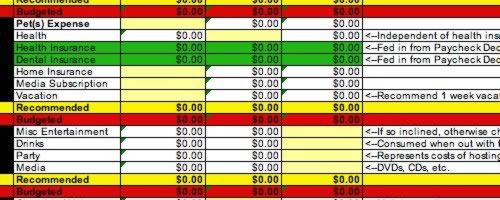
These two worksheets — one for your budget, and one for your spouse’s budget — are designed to be highly customizable. The pale yellow, purple, and shaded green cells are the editable cells. They’ve been placed in accordance with the most likely expenditure pattern for their category.
Additionally, the Budgets are split between primary expenses and secondary expenses. For the most part, secondary expenses can be considered to be your splurge budget, broken down so you have an expectation of how it will be spent.
New users should enter their actual expenses first in the yellow/purple shaded cells, and then enter their income information (which should all be contained on your pay stub). The final budget line at the bottom of the sheet will tell you the balance. I recommend that the final balance be positive, but not overly so. For instance, having an excess balance of $5 a week yields a fudge factor, in case you can’t avoid that box of donuts and coffee with your coworkers.
Retirement Planning
The retirement planning sheet makes several assumptions that may or may not reflect reality. For instance, it assumes constant returns, steady inflation, etc, steady savings rate, etc. However, it is useful as a guide, to see how much and for how long it approximately takes to get to a certain savings point. Most of the data is auto-fed from the budget sheet. Users can change the rate of return of pre-tax and post-tax investment, the expected inflation rate, and their expected raise rate in the yellow shaded cells.
Mortgage Planning
This simple tool will show the total cost of interest vs. principle, and how various schemes to pay off the mortgage will affect your bottom line. This is a simple form of analysis, and hopefully will become more advanced over time. Use bankrate.com to enter your information into the yellow shaded cells. When one position is paid off, you can note the year/month it ends and proceed to analyzing the remainder with a second pull from Bankrate.
This budget workbook continues to evolve. Thanks to all those who have already helped with some great ideas. Please feel free to ask questions or leave comments about the budget workbook here.
Stephen Popick holds a graduate degree in Economics from George Mason University and currently works as the Staff Statistician for a section within the US Department of Justice. Kudos to Popick for all his work on this spreadsheet!
This article is about Basics, Budgeting, Tools Friday, 20th April 2007 (by J.D. Roth)


RSS Feeds
Facebook
GRS Twitter


April 20th, 2007 at 5:29 am
Ick! What a mess…. I’ll gladly stick to my very user friendly MS Money any day over this spreadsheet. This SS is very hard on the eyes (what’s with the color?), not user friendly, and the layout is terrible (I hate having to search for info to get info back!). Things need to follow some sort of standard like a balance sheet or cash flow statement. In any case, it needs work.
April 20th, 2007 at 6:10 am
I understand that budgets are important tools for many people, but I’ve always taken that route that Thomas Stanley discusses in his great book “The Millionaire Next Door.” He talked about those millionaires who don’t budget but rather create an artificial economic environment of relative scarcity for themselves and their household. That is, they simply live far, far below their means and automatically “pay themselves first” in various investment accounts. Even though Dave Ramsey insists people make a budget, I’ve been able to accomplish most all his baby-steps w/out one … I’m currently on baby-step #6 — pay off your home mortgage early. I have no more debt now except for my house, and I will have that paid off by the time I’m 39, four years from now. And my wife and I only make an average middle-class income, which we don’t budget out. But we really do watch our spending; for example, I take my lunch to work EVERY DAY; I never eat lunch out, and rarely eat dinners out. I buy a lot of my clothes from places like Wal-mat and Target. I get almost 100% of my entertainment and books from the library. I drive an old pick-up that has no real power, and grandma’s pass me on the interstate. I trim my own hair. The list goes on, but you get the idea.
April 20th, 2007 at 6:25 am
Budgets work for some folks, and don’t work for others. Kudos to you if you’re able to control your spending without a budget. Despite my economic training, I’m not able to.
As to the un-user friendliness of the budget sheet, well, I hadn’t gotten that before. It’s no MS Money and is not designed as a substitute. It is however, free to use.
April 20th, 2007 at 6:56 am
D31-D33 should be E31*12, not E31*2
I think it’s a pretty comprehensive sheet, the only other addition I’d like to see would be an alternate investment account, not necessary your 401k/IRA investment, but money you play with on the side.
And I agree with the theory that budgets are great just to “keep score” and make sure you’re not running into any pitfalls. I personally will fill out my info, make conservative estimations, and then just try to live as far below that as possible. I don’t find it personally useful to try to allocate certain amounts for everything.
I invest first, necessities second, and try to save what I can after that, spending what I need to in order to remain content with what I have. Because I do it in that order, and am realistic about what I want and buy, I’m leaps and bounds ahead of peers…but everyone needs to find a system that suits them.
April 20th, 2007 at 7:08 am
When I went through FPU, I used the paper based budgeting forms. My wife preferred them, and we used them for a couple years, never going to a computer program to do our budget.
We made some mathematical errors here and there, so we took the basic forms from FPU and I put them into OpenOffice Calc. No more math errors here, its still in the format we got used to and like, and we print it out to review and make changes instead of staring at computer screens.
I’m sure the spreadsheet in this post is wonderful for those who like that kind of thing but I’m not trying to impress my boss for a promotion, I’m trying to tell my money where to go ;).
April 20th, 2007 at 7:39 am
Nathan,
One nice thing about Excel is that you can just change the savings fund to be say, ROTH IRA, or something similiar. In fact, that is what the savings fund is supposed to represent, post-tax savings.
April 20th, 2007 at 7:46 am
@Tyler: Mr. Popick has clearly invested a lot of time and energy and I for one greatly appreciate it. If you don’t find it useful then fine, don’t use it.
My mother always taught me that if I didn’t have anything nice to say I should keep it to myself.
To Mr. Popick, who I assume must be the above DC Economist, Thank you.
April 20th, 2007 at 7:50 am
I’d have to say, this seems like a “not for beginners” budget tool.
There was lots of information, but I couldn’t get my actual paystub information to align with the categories or math at all. (Granted, I have a few quirky elements, like imputed income for the value of my domestic partner’s health insurance coverage. But I also couldn’t figure out where more commonly used things like pre-tax Flexible Savings Accounts would go.)
April 20th, 2007 at 8:56 am
Despite the (surprising!) negativity, I think you’ve done people a great service with these worksheets. While a lot of articles and books note that many people don’t stick with budgeting because the monthly time commitment is a pain, I think many others simply don’t know how to start. Creating a master document can seem overwhelming for beginners. You’ve solved that problem and the time and effort that went into this is much appreciated. I might become a budgeter yet…
April 20th, 2007 at 9:03 am
@DC Economist
I agree excel can be amazing for these things, and I already made a few changes to it myself (I am not married, so taxes needed altering for example). I didn’t mention a thanks in the previous post, I’ve made spreadsheets like this before, so I can appreciate the time put into it.
I was just mentioning, because I divert funds to a high interest savings (emergency/backup fund), roth, normal checking/savings, and individual investments. I realize this is not the case for most, I was simply mentioning an extra row wouldn’t be a bad idea…after all, people might see it and feel a need to fill it, which would be a good thing in this case.
April 20th, 2007 at 10:29 am
Have you thought about doing a monte carlo simulation for the retirement portion of the spreadsheet? Assuming a steady rate of return is simplistic and not a particularly good model for how reality will hit.
Here are a couple of links describing monte carlo simulations, the first lets you fill in some details and it rolls the dice for you.
The second is more of a description of what monte carlo simulations are all about.
http://www.pivotpointadvisors.com/retirementcalculator.asp
http://www.moneychimp.com/articles/volatility/montecarlo.htm
April 20th, 2007 at 10:37 am
What’s with the negativity? This looks like a fun spreadsheet to me. Some people…
April 20th, 2007 at 10:52 am
Good gravy, haters! Shut up!
Popick - thanks for your initial work on this, and for listening to input and making changes.
April 20th, 2007 at 12:01 pm
This spreadsheet looks a lot like my own budget! I’m sure my spouse would never use a spreadsheet. He doesn’t even open his mail.
I have been using a budget spreadsheet since I got my first real computer, about 10 years ago. I don’t think mine is as complicated as this… mostly I just type in my bills, when they are due, and when I can expect a paycheck. Anything I make over the usual minimum amount is mine to spend or save.
I know I should be saving more than I spend
but I am working on that. It’s always something… dog gets attacked by nettles ($112) or horse rips the lining out of his nose ($180) or it’s someone’s birthday or Christmas or whatever.
I think the major point here is that everyone needs to use SOMETHING–whatever works for them–to keep track of what you are spending and saving/investing.
My husband always wonders where his money goes. I know where mine goes. I write it down.
April 20th, 2007 at 12:15 pm
I think the workbook is great. The only thing I would add is a section for child related costs, such as daycare/preschool/private school, personal needs (diapers, wipes, special products), clothing, medical/dental costs (other than insurance), extracurricular activities, etc. These items can really add up and can take a significant portion of a budget. Additionally, I would assume a section in that area for child support might be appropriate for some.
All in all, I think the worksheet is great and very thorough.
April 20th, 2007 at 4:58 pm
Stephen Popick,
You have provided a great tool for people to get started budgeting. There will always be people who are negative but you have done a great service to all the readers here so don’t be discouraged by some of the comments as most of us will appreciate your efforts!
April 20th, 2007 at 6:54 pm
Bob,
If I could find a way to write monte carlo in excel, I would. I can do it with SAS, SPSS, and Stata. Good idea, and I will look at it.
If there is a category missing, like FSAs, just insert a row in the appropriate area, and copy and use the format. Confirm the subtotal that pulls from that section.
I will put an FSA/Other Pretax into the next version. That’s a good idea.
Nathan,
You’re right that there are other post-tax savings…Id add them to the savings section by inserting rows and then making sure the subtotals are pulling in the new rows. I would like to note that any leftover funding goes into the same 5% high yield account, similiar to the yearly savings, car savings, and other short-term (less than 5 years) savings…5% high yield interest bearing accounts that are very liquid.
Mama’s Money
My suggestion would be to circumvent the paycheck stub calculator and enter your weekly net pay where it would normally be calculated…should work from there
April 21st, 2007 at 6:57 am
I like the spreadsheet. It’s confusing, but I think that is from me not understanding some budget things.
Which is why I like the spreadsheet, teaching me new stuff.
Please add the FSA section.
April 21st, 2007 at 8:23 am
[...] The Get Rich Slowly Budget Workbook (Version 2.0) (tags: money finance budget) [...]
April 21st, 2007 at 9:51 am
Great spreadsheet! I find it easy to read and get started. However, being in Canada, the assumptions embedded in many formulas don’t work. I would prefer being able to enter the dollar amounts of the deductions on my paystubs rather than having my deductions assumed. Thanks for all your work and generosity!
April 22nd, 2007 at 5:00 am
it’s great. i can easily get started with it. thank you very much
April 23rd, 2007 at 11:37 am
[...] Over at the Get Rich Slowly blog is an updated version of the “Get Rich Slowly Budget Workbook“. [...]
May 29th, 2007 at 6:42 am
[...] Get Rich Slowly Spreadsheet [...]
July 3rd, 2007 at 2:45 am
[...] ever-evolving Get Rich Slowly budget spreadsheet by Stephen [...]
December 14th, 2007 at 10:49 am
[...] The best way to track these expenses and control spending is to create a budget. There are plenty of websites with information on how to start a budget, complete with spreadsheets to help you categorize your spending. Examples include Pear Budget and Get Rich Slowly. [...]
January 28th, 2008 at 1:44 am
Thank you.
This spreadsheet is just amazing. What a great job, it helped me understand a lot about budgeting and even pushed me towards going deep into details about taxes (analyzing things I had not considered before).
Popick, you have all my respect and admiration for this excellent tool you provided to us. You did a great service to the community, and I hope that you’ll get back all the serenity that this tool will give to all of its users!
Again, most sincerely, thanks an awful lot.
January 28th, 2008 at 7:46 pm
I am having trouble downloading the second version of the Get Rich Slowly budget. When I click the link, I get transfered to another site w/ a bunch of letters and symbols. Is there another place where I can have access to it? Thanks.
February 6th, 2008 at 10:54 am
If you right click the link and then choose save target as, choose your desktop, then you may need to change the extension from .htm to .xls for it to open correctly, at least that is what I did.
I hope to be able to use this, it is kind of scary to see the numbers for the whole year, I start thinking I am doing pretty good, then realize I am within a couple thousand of my total yearly and might should consider some more cutbacks.
February 6th, 2008 at 11:12 am
thanks for the love guys. I’m going to make version 3 over the next few months taking all your suggestions into account
April 20th, 2008 at 8:28 am
Too bad I can’t download it by clicking on any of the links.
Edit: the way it’s configured right now, one MUST right-click on “second version” link, choose “Save Target As” in (Internet Explorer, IE) or “Save Link As” (in Firefox). If you are using Firefox, you’re done. If Internet Explorer is your browser, then you MUST change the extension of the file you’re saving from “htm” to “xls” (no quotes). Lots of work and I haven’t even started budgeting!
June 30th, 2008 at 7:35 pm
[...] from any computer and even my phone. If this doesn’t strike your fancy, there’s another pretty good spreadsheet at Get Rich [...]
June 15th, 2009 at 9:23 pm
[...] Get Rich Slowly Spreadsheet [...]
September 20th, 2009 at 7:06 am
About 5 years ago, I created my first “real” budget, due to a second marriage, one which came with debt. 2 years ago, I managed to pay off the last of our debt, and only had the mortgage remaining. as someone pointed out above, things do pop up. my initial goal of paying off the mortgage by 2011 has been pushed back to 2014, due to needing a second car, and then having to replace the first car. the final payment on those will be in 2 months, and I can go back to seriously crunching the mortgage down. I am going to download your spreadsheet, and will look it over, maybe get some new ideas from it, maybe not. the reason why I am commenting is that I know how time consuming it is to create a working spreadsheet, and wanted to say Thank You.
editing… I think your worksheet is broken? it downloaded, opened, but it seems to be only 1/2 of a page. this was from the second version link. the first one goes to page not found.