A Free and Simple Budget Planner
Published on - February 7th, 2008 (Modified on - November 30th, 2011) (by J.D. Roth) During past discussions of on-line money-tracking tools and desktop software, many Get Rich Slowly readers have sung the praises of home-brew budget planners built using Microsoft Excel. In this guest post from Jeff M., he shares a spreadsheet he created and describes his own budgeting system in detail.
J.D. doesn’t talk a lot about budgeting at Get Rich Slowly — he uses a spending plan — but I want to share a personal budget planner I’ve created that has helped me immensely. I’m not historically a budget person myself, but I’ve been using this for a while and it seems to be working quite well. I hope that some of you find it useful, too.
This budget planning spreadsheet is available in the following formats:
- Microsoft Excel (70kb) — right-click and choose “Save as…” to download. This file should also work with Open Office.
- Google Docs — select “File -> Copy spreadsheet…” to save to your account.
Please note: This spreadsheet is designed solely to keep you on a budget you’ve already set, not to help you create a budget. Budgets vary from person-to-person. Create one that works for you, and use this planner to track your progress. (If you need help developing a budget, try this budget estimator from GRS-reader Justin M.)
Budget planner overview
While my spreadsheet may seem complex at first, it’s actually very simple. It’s also much more customizable than any software program I’ve ever used. I’ve tried both Quicken and Microsoft Money, and but they just had too much going on. They were confusing. My spreadsheet holds a budget for an entire year, yet works on a month-to-month and day-by-day basis. It has a very simple structure:
- The first column contains labels for the various lines in the budget planner.
- The second column lists budgeted amounts for each item. Once you set up your budget, you should only have to change these numbers if your situation changes (you get a raise or a bill increases).
- There are subsequent columns for each month of the year. As you earn and spend money, note it on the appropriate line.
This budget planning worksheet is divided into four sections.
Pre-tax deductions
Section one contains all of your pre-tax deductions. This includes insurance and other company benefits. My company takes parking directly from my paycheck before taxes, and offers a computer purchase plan that removes money from my paycheck as well. Your budget might include a line for retirement accounts.
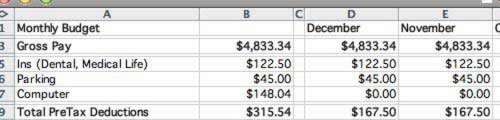
The first section contains pre-tax deductions.
Regular bills
Section two is headed with your Net Monthly Pay (for me, that’s two semi-monthly payments). It then lists all regular bills, including Needs and Wants. For budgeting purposes, I don’t differentiate between the two — if you pay for it monthly, it goes here. For me this includes my Rent, but also things like my XM Radio and Gym Membership. I also put my Savings amount here. By treating my Savings deposit like a bill, it comes out before I spend any other money. I pay myself first.
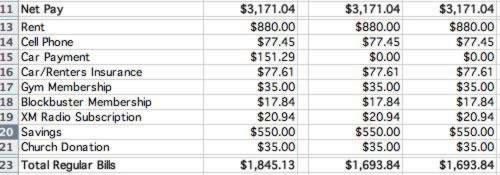
The second section is for regular bills.
Irregular expenses
Section three tracks your “Monthly Cash”, which is your Net Pay minus your Regular Bills. This is how much money you have available each month after your fixed expenses. I’ve budgeted for five categories, but you can easily add or remove them as you wish. I’m considering dividing “Food” into “Groceries” and “Dining Out” myself.
I’ve also included a Discretionary Budget which includes all manner of items, from Christmas Gifts to Movie Tickets to Alcohol to Speeding Tickets to Books and other entertainment for myself.
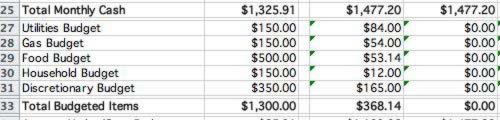
The third section is for irregular expenses.
Budget summary
After the “Budgeted Items” section, there’s a line to show how well you’ve stuck to your budget. [J.D.'s note: This is the concept of "cash flow" I mentioned recently. Jeff has a high positive cash flow!] This total is cumulative across all categories. If you go $50 over on utilities but cut back in food to compensate, that’s fine. Your budget will zero out.
This line measures budget performance.
Non-budgeted expenses
The final section contains a simple “Other” Category. I don’t like to have special expenses and income show up in my regular budgeted goals. If I get a bonus from work, I don’t want it to look like I made my budget when I didn’t. Likewise, if I put $900 into car repair but otherwise stayed perfectly within my regular budget, I don’t want to look like I missed horribly.
For example, this month I received a $580 bonus from work, but bought a $450 iPhone. I put both of those purchases in “Other”. My remaining funds for the month show how everything really worked out, but those nonstandard items haven’t wreaked havoc with my budgeting process.

The final section is for non-budgeted items.
Day-to-day use
The trick to staying with your budget is to track your purchases. This budget planner includes a worksheet for each month. Simply navigate to the sheet for the current month and put in a quick description of each purchase, and the amount.

Track your daily expenses on the monthly pages.
Personally, I do this via receipts. Everything I buy gets a receipt and I keep track of it. If I give $20 to a friend, I just write it on the back of a receipt I already have. I keep all of my receipts in my back left pocket, and each night (or every few nights), I put them all into the sheet. It takes all of five minutes to put in several days worth of purchases.
I’ve put some example numbers in for the December spreadsheet so you can see how it works.
Conclusion
You can keep the budget planner tidy by “hiding” columns and sheets for the coming months in Excel. (Under the “Format” menu, select “Column -> Hide” or “Sheet -> Hide”.) If you do this, the first column after the original budget numbers (and first sheet after “Total Budget”) will always be for the current month. When the next month comes, simply Unhide that month, and away you go. This keeps the current month close but past months available for reference. (I’m not sure Google Docs can do this.)
I hope you find this budget planner helpful. It took me several hours to get set up, but now tracking my budget only takes 5-10 minutes of work every few days. It’s so much easier to track my money this way than importing and analyzing a bunch of data from my bank and tracking my free credit report has made it all the more easier to understand the past errors and plan or correct my expenses wisely. I’ve been using this budget planner for six months, and I’m loving how much less money I waste.
If you’ve ever wondered “Where does all my money go?” this budget planner can help!. Several years ago I got a $10,000 raise, but succumbed to lifestyle inflation. This year I got a similar raise, and was determined to see most of it go to savings. And it has, thanks in part to this spreadsheet!
Download: Budget Planner (70kb Excel file)
This article is part of February’s MBN Group Writing Project, which is all about budgeting.
GRS is committed to helping our readers save and achieve your financial goals.Savings interest rates may be low, but that’s all the more reason to shop for the best rate.Find the highest savings interest rate from Ally Bank, Capital One 360, Everbank, and more.
This article is about Basics, Budgeting, Money Hacks, Tools
Disclaimer: This content is not provided or commissioned by American Express. Opinions expressed here are author's alone, not those of American Express, and have not been reviewed, approved or otherwise endorsed by American Express. This site may be compensated through American Express Affiliate Program.
Discover is a paid advertiser of this site. Reasonable efforts are made to maintain accurate information. See the Discover online credit card application for full terms and conditions on offers and rewards.
SEARCH FOR RECENT ARTICLES


Good post, might be something i’ll give a go in tandem with my visual method of tracking expenditures (wall calender with spending written into each square – blank squares make me happy!). Just recently figured a budget might be a good idea due to some overspending on DVDs, so good timing.
If i ever want to track in more detail, or have Total rows for more analysis, this might do the trick. I am all for free solutions to things like this – sure paid software is shiny, but so are coins, so i think i’d rather save them!
loading....
Receipts are too much of a pain to deal with. It is much easier to use cash. Plus if you take all the cash out for the month for a specific item it is impossible to overspend on that budget item. We do this for groceries, eating out, home stuff, and a few other minor categories.
loading....
Thanks, Jeff and J.D.! How did you know that one of the items on today’s to-do list was “Work on a new Excel budget layout”?
*checks it off, moves on to filling it out*
loading....
@The Saving Freak:
I realize that everyone has their own way of doing things. There are, however, two things I really like about receipts vs. cash.
1) I can actually see where it goes. With cash, you know that you spent $500 on food. With receipts, you can tell that you spent $380 eating out and $120 on groceries (as I recently did, which surprised me), or that you spent $85 in one month at Chipotle (also a recent sin of mine).
2) It doesn’t matter where the money comes from. I can pool cash with friends for delivery pizza and just write the amount on a piece of paper and stick it in my pocket, or I can charge a $100 nice dinner for my girlfriend and me on a debit card. Or I could put groceries on my credit card because I get rewards that way. Receipts don’t care where the money comes from.
Obviously, if cash works for you, thats excellent. I don’t anticipate this system to be perfect for everyone. I found Quicken’s bank data import to be too much of a pain because Quicken wanted me to use 75 categories for everything, and I just didn’t care that much, so I tried to find a way to make totaling up purchases after they had been made into something that wasn’t a hassle.
loading....
There is also PearBudget which a helpful budgeting spreadsheet that I’ve used the last couple of years and like. Can’t remember where I learned about it – probably here
loading....
I use two spreadsheets to keep track of my budget. The first is very similar to the Total Budget sheet you have here. The second is an Excel workbook that breaks my monthly budget down into daily amounts and shows me how I’m doing on my budget so far this month and this week.
I just made that second workbook public this weekend (http://code.google.com/p/wesabe-excel-budget/), check it out if you want a more detailed view of your spending. It is setup to download spending data from Wesabe, but if people are interested in using it without using Wesabe, it could certainly be modified to work with data entered from receipts.
loading....
I created my own budget planner in Excel a while back. It’s a bit more colorful and graphic than the one originally provided here, which some folks may like and other’s won’t. I have it set up with forumlas, so all you need to do is change the figures that are in bold text and the other figures will update automatically. You’ll need to change the State Tax formula to match your tax bracket for your state.
It’s a *.xlsx document made in MS Excel 2007. Older versions of Excel may not be able to open it.
Download it here
loading....
Thank you so much! It’s on my to do year after year, you’ve inspired me to start!
loading....
I wrote my list of fixed expenses on the top half of a sheet of notebook paper. And then I listed my irregular expenses on the bottom half, and divided that total by 12 to get the monthly amount to save, and have that amount automatically withdrawn each month from my checking account to my savings account as though it were a bill. Recording receipts would be a nuisance for me, so I withdraw cash and use that. I have online bill paying, so when an irregular expense becomes due (like 2nd installment of property taxes recently), I transfer that amount from savings to checking and pay it. (No matter what system a person uses, and Jeff’s system is excellent, the important thing is 1) list everything on “paper” first and 2) save for those irregular expenses: property taxes, car tags, car repairs, home repairs, boarding costs for pets, christmas/b-day spending, vacation, tax prepration fees, everything – so you’re not got offguard and won’t have to rely on credit cards.
loading....
I use a similar spreadsheet, but since I get paid every 2 weeks I found it hard to make my columns based on months. I have two-week columns outlining my income with what expenses I have to pay in that time.
I have them free to use/copy/whatever here: http://www.debtbeater.org/budget/
(they are outdated by a month, but the same principle applies to any time frame)
loading....
I go for automation. I don’t have the discipline to enter numbers myself. And frankly, I would rater use my time to do other things.
Here’s a blog reference about simplifying your budget. If you make it easier, you save time, and money.
http://holisticpersonalfinance.com/2008/01/28/tragically-unhip-part-1/
loading....
@John Smith
Do you really find it takes less time to choose a budget category in Quicken than to type in a number in Excel? I felt like I spent to much time in quicken trying to “split” transactions, or figure out how to handle cash transactions easily, or deal with the fact that I got $40 cash back from Target, so I didn’t really spent $75 there.
I REALLY, REALLY want automation to work. I just couldn’t get it to be faster than a formula driven, automated spreadsheet.
Not to mention the fact that certain banks (like Bank of America) charge up to $8.99 a MONTH to automatically download data into Quicken. Otherwise, you have to log into their site and manually download the file and import it.
loading....
I have created my own workbook for my budget. I used to use MS Money but realized that is good for after the fact and not management. I work on a 2 week budget system to fall in line with pay dates. It used to be a little more difficult because DH and I were on different pay dates.
This spreadsheet allows me to budget my bills on 24 paychecks and then decide how to use those 2 extra paychecks. I can’t average my salary monthly including those paychecks because I’d fall short every month. Each month gets it’s own tab with columns for budget, actual spent and amount remaining. If I overspend in one area, I have to deduct from another so income and expenses equal 0. Daily I download my transactions into another sheet. I then go to the appropriate month and pay period and deduct from the proper account.
Managing 4 weeks of groceries, eating out, and gasoline is too much time. I would easily say I overspent in week 1 but I can make it up over the rest of the month and then never stick to it.
I also find electronic transactions are easier to manage than receipts (DH won’t do receipts) or cash. I realize that some transactions take several days to hit my account but it has worked well up to now.
I would be happy to share a blank copy of this but not sure how.
loading....
part of a reason why we should create spreadsheets for our use is that we’re more likely to use something we have already invested into.
loading....
RE: automation
I really like the sound of automation, but now that we’re trying to run everything using the cash-in-envelopes approach there’s still manual entry to be done.
I’d like to think spreadsheets are good tools for those who still need to grasp the fundamentals of what’s going on and create good habits. Much like my elementary kids need to know how to do math problems before I’ll let them just start using a calculator to make sure they know and understand what’s going on with the automation.
Automation does sound very appealing for people that already have a good system down and know what’s going on with their money. I sure wouldn’t mind being able to spend less time focused on getting from paycheck to paycheck with a more automatic setup. For now I’m going to do my daily duty and have my financial progress on my mind all the time until I clean up my mess.
loading....
hmm. this is a more effective way to run a budget than what i’ve got. i just might try this and see if it does me any better
loading....
As Paul said…..PEAR BUDGET! http://www.pearbudget.com
Also
http://www.lulu.com/content/1581272
loading....
Thank you! I’ve put together numerous budgets before– but this one looks really easy to use (much easier than what I’ve been doing!).
Always get such terrific tips from this site.
Hydes
loading....
Another benefit to using an Excel file for your budget is that it makes evaluating and planning major (or minor) financial changes very easy.
For example, if you’re considering buying a new car, or changing your cell phone plan, etc., simply insert a new line into your budget, or change all the data in the cell phone line item. THEN “save as” a different name (like, maybe, “new car possibility”), and you have it right there for as long as you need it (i.e., as long as it takes you to decide that you really don’t need a new car).
I built an Excel budget at the beginning of 2005 that essentially tracks what I *could have* in savings if I’m able to stick to the budget. Each day I update my checking balance, savings balance, IRA balance, and any automatic payments that have hit, and my financial potential is automatically updated through the end of 2011.
Of course, not everything can be known 100% that far in advance, but as we say in the Army, an 80% solution now is more helpful than a 100% solution too late.
loading....
Couldn’t agree more about using Excel as a tool. If you use a software system, you are just entering data and it makes it a tougher habit to start. If you design the tool and more importantly the process around managing the tool, I find the user is much more likely to stick with it. I always like to see how other folks layout a budget.
Devin
loading....
I’m wary of Excel based budgets. There is a lot of room for error if you truly do not understand how to use Excel. I agree with Paul. PearBudget is the best there is out there. Simple, straightforward and easy to use. It does require you to get your hands a little dirty though. Automation is not better. Being able to download transactions automatically is not always better. My wife and I find that by having to manually enter transactions each week into our checkbook and budget programs that we tend to more carefully monitor our spending. It is similar to Dave Ramsey’s philosophy about cash versus credit card spending. It “hurts” more if you have to enter this data by hand and say to yourself was this really a need or just a want? You need to pay yourself first and dictate where your spending will be going through a budget plan rather than downloading historical data from your bank through Quicken or MS Money to find out where it went. We have tried Quicken and MS Money and have even tried the following programs with varying degrees of success: Mint; Yodlee; My Budget Planner; YNAB Excel based and Pro; Mvelopes; and most recently BudgetSimple. We have even tried many of these programs simultaneously for a month at a time to really “kick the tires”. Yes, that was a lot of work but we wanted to make sure they were working by verifying the numbers against a similar program. We now exclusively use PearBudget.
loading....
This is good. It’s roughly what I do, but it’s tidier.
So…when you get your paycheck, then, you actually enter the pre- and post-tax deductions IN your budget, copying the figures off your pay statement?
I can see the advantage of this, in that it would allow you to run a report that would produce figures you could compare with your W-2. I’ve just been entering net paychecks and (incorrectly) trusting to my employer to get the various figures right…big mistake. In this year’s PeopleSoft fiasco, so many screw-ups were generated that not one thing is right. It’s clear the W-2 My Beloved Employer and its pal, PeopleSoft (aka Laurel & Hardy) is wrong, but without having kept track of all the figures on my paycheck, as you have done, I can’t even imagine how to find their error and explain it to them.
loading....
I use a bit more complicated spreadsheet, but it works great for me.
I download all my transactions from my bank website and copy them onto a Register sheet. I have a field for type of expense and notes.
I have another sheet which will perform SUMIF calculations based on the type of expense and date range. Since I get paid twice a month, all my expenses are based on each paycheck.
A third sheet compares my budget to actual spending for each period. This lets me know my progress as far as deviating from expenses, which I use to control spending and revise future budgets.
Finally, a cover page gives me a quick look at my current period spending versus budget, anticipated expenses, my current account balance, and expected balance at the end of the period.
Sounds complicated, but for us desk jockeys who play with numbers all day anyway, it’s pretty simple. I’d upload it somewhere, but don’t know where, and it isn’t too user-friendly for anyone else (yet). But it does the job better than any program I’ve tried to date.
And best of all, I am living within my means for the first time and paying down debt on my current salary.
loading....
[...] A Budget No Credit Needed: Living On A Budget – Don’t Knock It Until You Try It Get Rich Slowly: A Free And Simple Budget Planner Free Money Finance: My Confession: I’m Not Doing A Budget For 2008 Consumerism Commentary: Actual [...]
loading....
Last year I created my own budget spreadsheet using Google. When I revamp my spreadsheet, I plan on incorporating most of your ideas. I have separate bank accounts, and while I keep close track of my bills, I don’t so much with my other expenses. Part of me is afraid to. (Only $85 at Chipotle? lol)
However, there are 2 things I do that I don’t see on your sheet. First, I put the due dates for my various bills, and label them a certain way so that I remember how they are paid (automatic bill pay via bank, manual bill pay, automatic from biller, or manual via biller website). Second, since I get paid 2 times a month, I split my bills up by whether they get paid out of the first or second paycheck of the month. I also split my rent between the 2 paychecks and try to keep the amounts paid in each half of the month about the same.
Anyway, just a couple of ideas you might want to think about incorporating into your own spreadsheets.
loading....
I use the ‘no budget’ approach:
1. Once a year (actually, I’ve only needed to do this once in my life) I tracked every single penny that I earned or spent for just ONE MONTH. I was $30k in debt then.
2. Now, I calc my Net Worth once a year (CNNMoney has a calculator on their site), divide by 40 (I am VERY conservative) and that’s what I spend for that year. Simple!
3. Anything extra (business earnings, contracts … basically, any money that I earn that carries risk) is saved and added to my Net Worth when I repeat the calcs next year.
1. was my ‘starting out budget’; 2. and 3. is my ‘retirement budget’; I find once a year plenty for both.
loading....
You can hide a column or columns in Google Spreadsheet by selecting them and then right clicking on them and selecting “Hide…”
loading....
I LOVE IT! I come from a long line of thrifty people, so I always manage to live within my means. However, I would say my system for tracking spending has been limited to balancing my checkbook. I like to keep things simple and this spreadsheet is PERFECT. I feel smarter about my spending already. Thanks for sharing it.
As a side item, I’d like to mention that I only subscribed to your feed a couple of months ago, but I have been thoroughly impressed. After working on your blog for so long, I’m sure you are accustomed to compliments. At the same time, it is always nice to know that your contributions are appreciated. I do appreciate yours.
loading....
[...] Rich Slowly: A Free and Simple Budget Planner. I use one similar to this and may borrow some [...]
loading....
I have also posted my Google and Excel budget spreadsheets, which you may find to be a bit more functional, intuitive, and clean than the versions you see here, IMHO. You can download them here: http://20somethingfinance.com/blog/2008/02/10/personal-budget-spreadsheet/
loading....
[...] you’re relatively new to money matters you can find out about simple budget plans or maybe how a little reverse budgeting might work better for you. Learn how you could [...]
loading....
Great post and spreadsheets! Thanks for sharing these. However, i have noted one small omission. its either because i am all of a sudden blind or that Google Spreadsheets hates Firefox on Mac OS X Leopard.
There is no place to enter in taxes that are withheld from a paycheck. Am I to create this field myself or do I enter the gross pay minus the taxes in the Gross Pay field?
I am modifying it a little bit and will share my template with everyone once i am finished, if anyone would like to see it.
loading....
@Brian
I personally didn’t care enough to enter those taxes, so I simply input my Net Pay number manually, instead of calculating it from gross. You could certainly add tax lines and calculate them if you wanted.
loading....
So I bookmarked this as a GRS post to check out later, and boy I’m glad I came back to it. The spreadsheet is amazing. I spent hours modifying it (playing with it, really) today. It will be so useful.
Thanks so much for sharing this Jeff, you’re awesome!
loading....
Thanks! I’ll use this and work my way out of $16000+ in student loans!
My goal is to pay that off in 3 years with monthly payments of $500, simultaneously saving $400 each month.
Thankfully I have few monthly expenses (no new car, mortgage, etc) so I believe that this is realistic. Once I have a better gauge of my income I can adjust accordingly. Thanks!
loading....
Thanks for sharing this spreadsheet! I modified it slightly, but once I got the numbers right, the spreadsheet worked perfectly for my budget needs.
loading....
Thanks for the useful spreadsheet. The link in post 17 is also great:
http://www.lulu.com/content/1581272
Thank you Jeff and Wave!
loading....
Thank you, great spreadsheet! I love your site, always providing great information. Creating a budget is the first step to improving your finances. Thanks again!
loading....
Your spreadsheet is great. However many would benefit from an even simpler budgeting software called Innoslice. I used it for my simple expense tracking, and never had to look for another spreadsheet or app.
loading....
I’ve found something simplest possible:
http://simplemoneyplanner.com
However it seems to be on early developing stage it’s simple like a hammer …
loading....
The great thing about MS Excel is that it is in a way a development platform, a tool to allow users to develop and build anything we want to have customized to our needs, anything to do with holding, calculating and relating numbers with text headings. That is really flexible and powerful as shown in this excellent post. For those among us who want to do away with installing and maintaining software on each computer used like MS Excel, and are more comfortable firing a browser on any computer, going to some link on the web and budgeting away in total privacy and safety, there are the new breed of web apps like Out Of The Dark (OOTD) Budgeting which I used for almost two years now very happily.
A few things I really like about OOTD are: Its unique approach to handling one month at the time, then saving it, closing it and moving to the next month means it will handle all the years of budgeting I care to throw at it until my dying day, month by month. It has the easiest expense tracking I have seen with a tracking column on the same page next to the budgeting column. It has Cash Put-Aside management built right into my budget and it has a thing called Credit Card Debt Terminator also build into the budget, this alone was worth using OOTD for me because it helped me wipe out my bad credit card debt in 8 months flat.
Excel is definitely a powerful tool, but web apps are quickly gaining power and worth checking out.
loading....
I am unable to download this! Can someone help me?
loading....
I got it:)
loading....
Hi Jeff,
I downloaded your spreadsheet in Aug 2011. We added a few additions/changes to fit our needs and have used it faithfully every month since. I am currently working on a budgeting blog post and would like to recommend your spreadsheet if that’s okay. However, your current excel download just links to another page on this website. Any chance this can be remedied? The Google Doc link seems to work, but it would be nice to be able to download it. Thank you for sharing this! It’s been great.
loading....
Hi Jeff,
I would really like to download your budget but the link for the Excel download does not work it seems to be linked to another page on your website.
loading....
